
Names and functions of each part of Smart Web Unit
Part Names
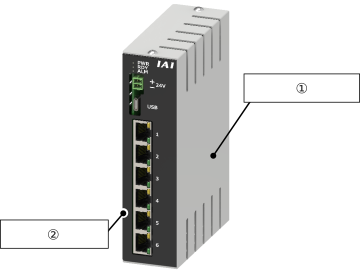
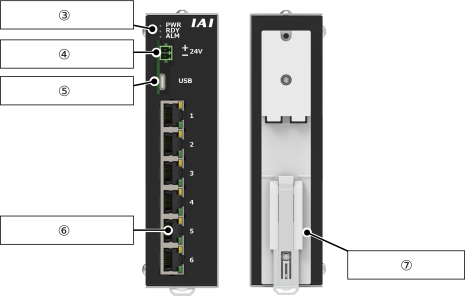
External view
① | Top cover |
② | Lower cover |
③ | System status LED |
④ | Connector for 24V power supply |
⑤ | USB connector |
⑥ | Ethernet connector ×6 |
⑦ | DIN rail mounting bracket |
System Status LED Display
Panel notation | Display color | Status | Description |
|---|---|---|---|
PWR | Green | Light ON | Power ON |
Light OFF | Power OFF | ||
RDY | Green | Light ON | Connection to IAI products completed |
Green | Blinking | Connection to IAI products not completed | |
Light OFF | Power off or Web application not activated | ||
ALM | Red | Light ON | Web application terminated abnormally |
Light OFF | Power off or Web application activated | ||
Ethernet Connector LED Display
Display color | Status | Description |
|---|---|---|
Green | Light ON | Detecting link status |
Light OFF | Link inactive | |
Orange | Blinking | Activity present |
Light OFF | No activity |
Ethernet Connector
This is a connector for Ethernet connection.
A Category 5 or higher straight STP cable is recommended for the connection.
Refer to Overseas Standards Compliance Manual (ME0287) as necessary.
A Category 5 or higher straight STP cable is recommended for the connection.
Refer to Overseas Standards Compliance Manual (ME0287) as necessary.

Pin No. | Signal name | Description |
|---|---|---|
1 | TXP | Transmit data + side |
2 | TXN | Transmit data - side |
3 | RXP | Receive data + side |
4 | NC | Not connected |
5 | NC | Not connected |
6 | RXN | Receive data - side |
7 | NC | Not connected |
8 | NC | Not connected |
24V Power Connector
This is a connector for supplying power to the Smart Web Unit.
Ensure that the input voltage at this connector is 24V +/-10%.
Ensure that the input voltage at this connector is 24V +/-10%.
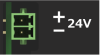
Pin No. | Signal name | Description |
|---|---|---|
1 | +24V | 24V power input |
2 | -24V | 0V |
USB Connector
This is a connector for connecting to the wireless device parameter setting tool.
The maximum USB cable length should be 4m.
The maximum USB cable length should be 4m.

Pin No. | Signal name | Description |
|---|---|---|
A1 | GND | 0V |
A4 | VBUS | Bus power supply |
A5 | CC1 | For connection configuration |
A6 | D+ | USB communication line + |
A7 | D- | USB communication line - |
A8 | NC | Not connected |
A9 | VBUS | Bus power supply |
A12 | GND | 0V |
B1 | GND | 0V |
B4 | VBUS | Bus power supply |
B5 | CC2 | For connection configuration |
B6 | D+ | USB communication line + |
B7 | D- | USB communication line - |
B8 | NC | Not connected |
B9 | VBUS | Bus power supply |
B12 | GND | 0V |