
Preparation Before Wiring (ICD-CTU)
Set parameters such as the IP address before wiring.
Requisite Devices
USB cable (USB Type-C connector (This unit side)): 1
Connection Diagram
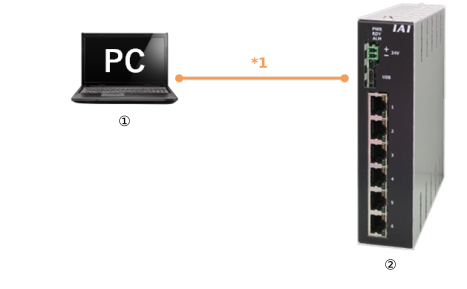
*1 USB cable (To be prepared by user)
① | PC software | Wireless device parameter setup tool |
➁ | Smart Web Unit | Model: ICD-CTU-* |
Wireless Device Parameter Setup Tool
Start the wireless device parameter setup tool on the PC software and set up the parameters.
For details of the setting parameters, refer to Smart Web Unit Parameters .
For details of the setting parameters, refer to Smart Web Unit Parameters .
After assigning an individual IP address to this product, parameter configuration can be performed via the network connected through Ethernet.
When connected via USB, the parameters that can be set should be limited.
When connected via USB, the parameters that can be set should be limited.