
Maintenance Parts (ICD-CTU)
Remove the upper cover
Remove the four screws on the top and bottom, and then remove the upper cover.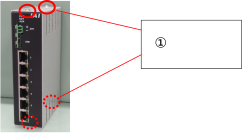
①: Four screws on the top and bottom M3×5 Truss head screws
Remove the old battery
Insert a slotted screwdriver or tweezers into the (–) terminal of the battery connector BAT301 and remove it using leverage. Be careful to prevent the battery from springing out.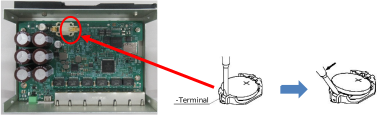
Install the new battery
Carefully check the polarity of +/– of the battery. Place the (+) side of the button battery against the (+) terminal of the battery connector BAT301, then press the (–) side into place. At this time, do not press straight down, but sliding the battery toward the (+) terminal makes insertion easier. Also, be careful not to apply excessive force to the board when installing.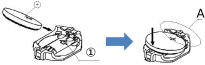
①: ⇒Mark
Attach the upper cover
Using the screws removed in Step 1, attach the upper cover.Set the time
Set the time using the wireless device parameter setup tool.