Installation of WLAN/Bluetooth Converter
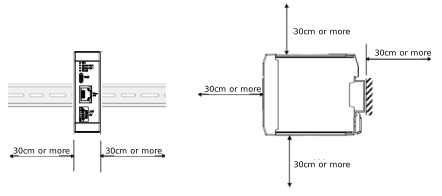
Consider such facts as size of control panel, layout of a controller and cooling performance in design and setup so the ambient temperature falls into the range from 0 to 40°C.
Item | ||
|---|---|---|
Installation | Installation direction | Vertical mounting |
Installation method | DIN rail mounting | |
Installation conditions | See the figure below and the notes | |
Precautions for Installing a WLAN/Bluetooth Converter
To prevent wireless communication errors, pay careful attention to the installation location of the WLAN/Bluetooth converter.
In addition, changes in the environment may cause conditions to differ from those at the time of installation, which may result in communication errors after operation begins.
In addition, changes in the environment may cause conditions to differ from those at the time of installation, which may result in communication errors after operation begins.
- Install as far away from metal as possible and in a location with a clear line of sight.
- Install at least 30 cm away from metal walls, plates, etc.
- Be aware that wireless communication errors are more likely to occur between rooms separated by concrete walls. (Concrete blocks radio waves.)
- Keep as far away as possible from objects that generate noise (such as electronic equipment and fluorescent lights). (Install at least 1 m away.)
- Materials with high moisture content, such as plants and soil, absorb radio waves. Avoid placing them between devices that communicate wirelessly.
- Do not place directly on the ground.