
Backup
This function performs backups of parameters and position data of controllers communicating with the Smart Web Unit based on a preconfigured schedule.
Up to 10 file generations can be managed.
Up to 10 file generations can be managed.
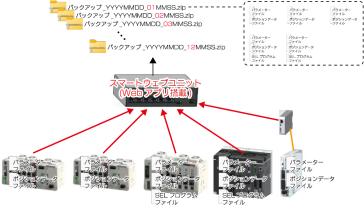
Backup Processing
Users can execute a backup at any desired timing.
Unlike periodic backup, this function performs a backup for the currently selected axis only.
Unlike periodic backup, this function performs a backup for the currently selected axis only.
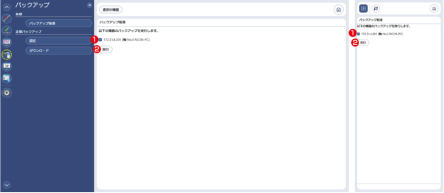
- Select Target Axis
Turn the checkbox on to perform a backup. - Execute button
Press it to execute the backup.
Periodic Backup Settings
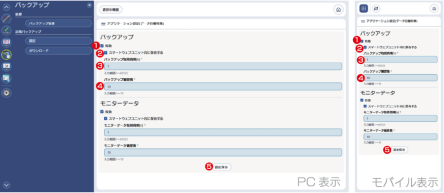
Figure 8.13 Periodic Backup Settings, Saved in Smart Web Unit
- Enable/Disable Backup Function
Switches the backup function abled/disabled.
The backup targets are as follows:
CON system | Parameter, Position |
SEL system | Parameter, Position, SEL program Symbols, Coordinate system definition data, Global data |
- Save to Smart Web Unit
Whether to save backup files to the storage inside the Smart Web Unit or to an external network storage can be selected. - Backup Acquisition Cyclel [h]
Sets the cycle for executing backups. The unit is “hours”.
It can be set within the range of 1 to 65,535. - Number of Backup History
Sets the number of backup file generations to be stored.
Up to 10 files can be saved. - Save Settings Button
Press it to save the settings.
Note that changes to items 1 to 4 will not be applied unless the [Save Settings] button is pressed.
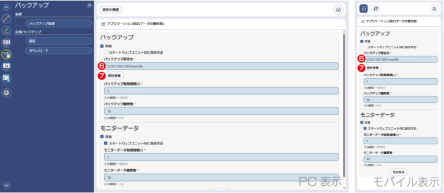
Figure 8.14 Periodic Backup Settings, Saved to External Storage
- Backup Storage Location
It is an item displayed only when the checkbox in item 2 is off.
Sets the path of the external storage where backup files will be saved. - Credentials button
It is an item displayed only when the checkbox in item 2 is off.
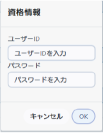
Displays the screen for registering credentials (user account information) required to connect to the external storage where backup will be saved.
Periodic Backup Data Download
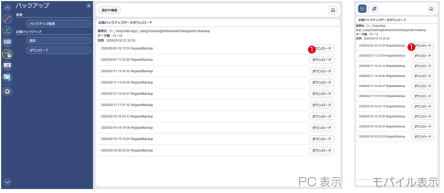
- Operation column (Download button)
By pressing the [Download] button, you can download the periodic backup displayed in the same row.