
Names and functions of each part of WLAN/Bluetooth Converter
Part Names
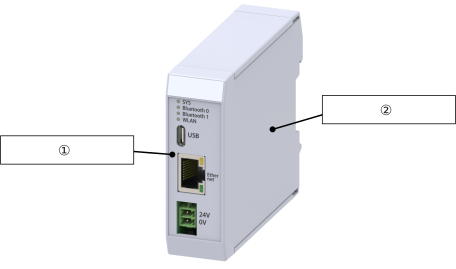
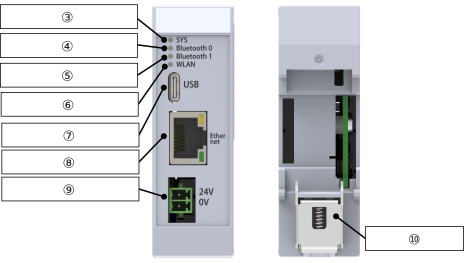
External view
① | Case body Upper part |
② | Mounting base housing |
③ | System status LED |
④ | Bluetooth 0 status LED |
⑤ | Bluetooth 1 status LED |
⑥ | WLAN status LED |
⑦ | USB Connector |
⑧ | Ethernet Connector |
⑨ | Connector for 24V power supply |
⑩ | DIN rail mounting bracket |
System Status LED Display
Panel notation | Display color | Status | Description |
|---|---|---|---|
SYS * | Green | Light ON | TCP connection established |
Blinking | TCP connection not established | ||
Red | Light ON | System error | |
Blinking | Parameter error | ||
Light OFF | Power OFF | ||
* It is off when operating on USB bus power supply.
Bluetooth0 Status LED Display
Panel notation | Display color | Status | Description |
|---|---|---|---|
Bluetooth 0 *1 | Green | Blinking (high speed)*2 | Bluetooth connection established |
Blinking (slow speed)*3 | Waiting for Bluetooth connection to be established | ||
Blinking (single) | Bluetooth device detection *4 | ||
Red | Light ON | Bluetooth error | |
Light OFF | Power OFF | ||
*1 It is off when operating on USB bus power supply.
*2 Blinks at 0.5-second intervals.
*3 Blinks at 2-second intervals.
*4 Momentarily blinks each time a device is detected (function available only on the Bluetooth 0 side).
*2 Blinks at 0.5-second intervals.
*3 Blinks at 2-second intervals.
*4 Momentarily blinks each time a device is detected (function available only on the Bluetooth 0 side).
Bluetooth1 Status LED Display
Panel notation | Display color | Status | Description |
|---|---|---|---|
Bluetooth 1 *1 | Green | Blinking (high speed)*2 | Bluetooth connection established |
Blinking (slow speed)*3 | Waiting for Bluetooth connection to be established | ||
Red | Light ON | Bluetooth error | |
Light OFF | Power OFF | ||
*1 It is off when operating on USB bus power supply.
*2 Blinks at 0.5-second intervals.
*3 Blinks at 2-second intervals
*2 Blinks at 0.5-second intervals.
*3 Blinks at 2-second intervals
WLAN Status LED Display
Panel notation | Display color | Status | Description |
|---|---|---|---|
WLAN *1 | Green | Blinking (high speed)*2 | WLAN connection established |
Blinking (slow speed)*3 | Waiting for WLAN connection to be established | ||
Red | Light ON | WLAN error | |
Light OFF | Power OFF | ||
*1 It is off when operating on USB bus power supply.
*2 Blinks at 0.5-second intervals.
*3 Blinks at 2-second intervals
*2 Blinks at 0.5-second intervals.
*3 Blinks at 2-second intervals
Ethernet Connector Status LED Display
Display color | Status | Description |
|---|---|---|
Green | Light ON | Detecting link status |
Light OFF | Link inactive | |
Red | Light ON | 100Mbps connection |
Light OFF | 10Mbps connection |
Ethernet Connector
This is a connector for Ethernet connection.
A Category 5 or higher straight STP cable is recommended for the connection.
Refer to Overseas Standards Compliance Manual (ME0287) as necessary.
A Category 5 or higher straight STP cable is recommended for the connection.
Refer to Overseas Standards Compliance Manual (ME0287) as necessary.
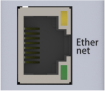
Pin No. | Signal name | Description |
|---|---|---|
1 | TXP | Transmit data + side |
2 | TXN | Transmit data - side |
3 | RXP | Receive data + side |
4 | NC | Not connected |
5 | NC | Not connected |
6 | RXN | Receive data - side |
7 | NC | Not connected |
8 | NC | Not connected |
USB Connector
This is a connector for connecting to the wireless device parameter setting tool.
The maximum USB cable length should be 3m.
Refer to Overseas Standards Compliance Manual (ME0287) as necessary.
The maximum USB cable length should be 3m.
Refer to Overseas Standards Compliance Manual (ME0287) as necessary.

Pin No. | Signal name | Description |
|---|---|---|
A1 | GND | 0V |
A4 | VBUS | Bus power supply |
A5 | CC1 | For connection configuration |
A6 | D+ | USB communication line + |
A7 | D- | USB communication line - |
A9 | VBUS | Bus power supply |
A12 | GND | 0V |
B1 | GND | 0V |
B4 | VBUS | Bus power supply |
B5 | CC2 | For connection configuration |
B6 | D+ | USB communication line + |
B7 | D- | USB communication line - |
B9 | VBUS | Bus power supply |
B12 | GND | 0V |
24V Power Connector
This is a connector for supplying power to the WLAN/Bluetooth Converter.
The maximum power supply cable length should be 3m.
Refer to Overseas Standards Compliance Manual (ME0287) as necessary.
The maximum power supply cable length should be 3m.
Refer to Overseas Standards Compliance Manual (ME0287) as necessary.

Pin No. | Signal name | Description |
|---|---|---|
1 | 24V | 24V power input |
2 | 0V | 0V |