
Parameter Description (ICD-WLBT)
IP address
Set the IP address assigned to the WLAN/Bluetooth converter.
Subnet mask
Set the subnet mask of the network to which the WLAN/Bluetooth converter is connected.
Default gateway
When connecting via a router or gateway, set the IP address of the router or gateway in your network environment as the default gateway.
If this unit does not communicate with networks outside the subnet, set it to No Setting (0.0.0.0).
If this unit does not communicate with networks outside the subnet, set it to No Setting (0.0.0.0).
Port number for UDP search frame
Set the port number used by the Smart Web Unit or IA-OS to detect WLAN/Bluetooth converters on the network.
Search port number
Set the port number used by the WLAN/Bluetooth converter to search for controllers or Ethernet/RS-485 converters on the network.
WLAN function setting
Set the communication system used for network connection. Specify enable/disable as 1/0.
0 WLAN disabled (operates in Ethernet only)
1 WLAN enabled (operates in WLAN only)
0 WLAN disabled (operates in Ethernet only)
1 WLAN enabled (operates in WLAN only)
WLAN country code
Set the country code for the country (region) where this unit is used.
Refer to the table below for country codes.
Contact us if the country (region) you intend to use is not listed in the country code table.
Refer to the table below for country codes.
Contact us if the country (region) you intend to use is not listed in the country code table.
Setting Example: “JP” (0x4A50)
Country Name | Country Code | Country Name | Country Code | ||||
|---|---|---|---|---|---|---|---|
Ascii | Hex | Ascii | Hex | ||||
日本 | Japan | JP | 4A 50 | デンマーク | Denmark | DK | 44 4B |
アメリカ | America | US | 55 53 | ドイツ | Germany | DE | 44 4D |
カナダ | Canada | CA | 43 41 | ハンガリー | Hungary | HU | 48 55 |
アイルランド | Ireland | IE | 49 45 | フィンランド | Finland | FI | 46 49 |
イタリア | Italy | IT | 49 54 | フランス | France | FR | 46 52 |
エストニア | Estonia | EE | 45 45 | イギリス | United Kingdom | GB | 47 42 |
オーストリア | Austria | AT | 41 54 | ブルガリア | Bulgaria | BG | 42 47 |
オランダ | Netherlands | NL | 4E 4C | ベルギー | Belgium | BE | 42 45 |
キプロス | Cyprus | CY | 43 59 | ポーランド | Poland | PL | 50 4C |
ギリシャ | Greece | GR | 47 52 | ポルトガル | Portugal | PT | 50 54 |
クロアチア | Croatia | HR | 48 52 | マルタ | Malta | MT | 4D 54 |
スウェーデン | Sweden | SE | 53 45 | ラトビア | Latvia | LV | 4C 56 |
スペイン | Spain | ES | 45 53 | リトアニア | Lithuania | LT | 4C 54 |
スロバキア | Slovakia | SK | 53 4B | ルーマニア | Romania | RO | 52 4F |
スロベニア | Slovenia | SI | 53 49 | ルクセンブルク | Luxembourg | LU | 4C 55 |
チェコ | Czech Republic | CZ | 43 5A | ||||
WLAN scan RSSI threshold
Set the reception level threshold for the WLAN access point. If the received signal level of the WLAN access point falls below the configured threshold, the connection will be restricted.
Setting Example: -60 [dBm]
(WLAN access points with a reception level of -60 dBm or higher can be connected.)
Setting Example: -60 [dBm]
(WLAN access points with a reception level of -60 dBm or higher can be connected.)
WLAN transmit power
Set the WLAN transmission power.
The transmission power setting applies to 2.4 GHz band communication.
Transmission power for 5 GHz band communication cannot be changed.
The transmission power setting applies to 2.4 GHz band communication.
Transmission power for 5 GHz band communication cannot be changed.
Refer to the graph below for the transmission power corresponding to each setting value.
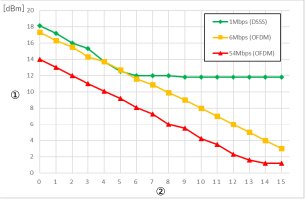
① | Transmit power |
➁ | WLAN transmit power setting |