
Preparation Before Wiring (ICD-ETSE)
Set the parameters before wiring.
Requisite Devices
USB cable (USB Type-C connector (This unit side)): 1
Connection Diagram
Parameter settings can also be configured using power supplied via the USB port. (bus power)
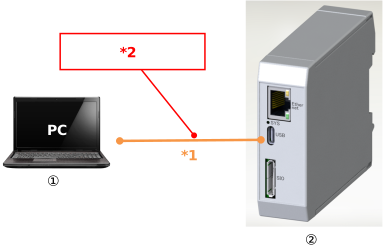
*1 USB cable (To be prepared by user)
*2 USB connection takes priority.
Be aware that other functions (Ethernet, RS-485) will be disabled when connected via USB.
Be aware that other functions (Ethernet, RS-485) will be disabled when connected via USB.
① | PC software | Wireless Device Parameter Setup Tool |
➁ | Ethernet/RS-485 Converter | Model: ICD-ETSE-* |
* When the USB is disconnected, other functions (Ethernet, RS-485) will start operating.
Wireless Device Parameter Setup Tool
Start the wireless device parameter setup tool and configure the parameters.
For details of the setting parameters, refer to Ethernet/RS-485 Converter Parameters .
For details of the setting parameters, refer to Ethernet/RS-485 Converter Parameters .