
Maintenance
Maintenance Information
This is the screen for displaying maintenance information.
CON system
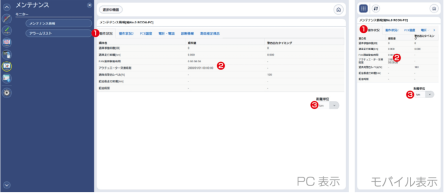
- Category Selection
Switches the displayed maintenance information by changing tabs. - Display Part
Maintenance information is shown in this area. - Distance Unit Switch
Switches the unit used for displaying distance-based values.
Options are [km] and [m].
SEL system
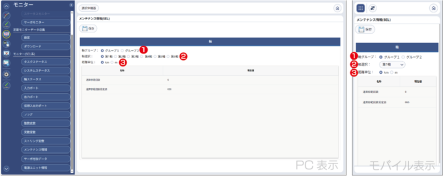
- Axis Group Tab
AThe axis group to be displayed can be switched. - Axis Selection
Which axis number maintenance information is displayed for can be switched. - Distance Unit Switch
Switches the unit used for displaying distance-based values.
Options are [km] and [m].
Alarm List
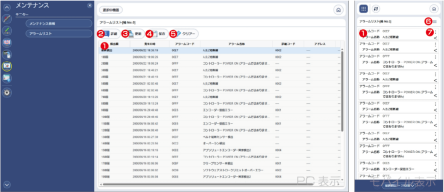
- List Display Part
Displays the list of alarm history. - Details Button
Press it to open detailed information for the selected alarm.
You can also open the details by double-clicking an alarm history entry.
On mobile devices, open the details from 7. Per-History Menu. - Update Button
Press it to update the alarm list to the latest status.
On mobile devices, use 6. Operation Menu to refresh. - Save Button
Press it to save the alarm list to a file.
On mobile devices, use 6. Operation Menu to save. - Clear Button
Press it to clear the alarm list.
On mobile devices, use 6. Operation Menu to execute this action. - Operation Menu (Mobile devices only)
Use this menu to perform refresh, save, and clear operations. - Menu by History (Mobile devices only)
Use this menu to open detailed information for the corresponding alarm history entry.