Smart Web Unit
Smart Web Unit
WLAN/Bluetooth® Converter
Ethernet/RS-485 Converter
Instruction Manual
ME0495-1A
ICD-CTU | WLBT | ETSE
Introduction
Please Read Before Use
ICD-CTU Instruction Manual Configuration
Safety Guide
Safety Precautions for Our Products
Alert Indication
Precautions for Handling
International Standard Compliance
Precautions for Handling Wireless Operation
Precautions for Axis Operation with Wireless Connection
Security Precautions
WLAN Risks
Overview
Overview
System Configuration
Names and Functions of Each Part
Names and functions of each part of Smart Web Unit
Names and functions of each part of WLAN/Bluetooth Converter
Names and functions of each part of Ethernet/RS-485 Converter
Controller Version
Teaching Tool Version
Specifications
Components
Smart Web Unit Components
WLAN/Bluetooth Converter Components
Ethernet/RS-485 Converter Components
How to Read the Model Plate
Smart Web Unit Model Plate
WLAN/Bluetooth Converter Model Plate
Ethernet/RS-485 Converter Model Plate
How to Read the Model
Smart Web Unit Model
WLAN/Bluetooth Converter Model
Ethernet/RS-485 Converter Model
List of Basic Specifications
Basic Specifications and Environmental Conditions of Smart Web Unit
Basic Specifications and Environmental Conditions of WLAN/Bluetooth Converter
Basic Specifications and Environmental Conditions of Ethernet/RS-485 Converter
External view
Smart Web Unit Exterior View
WLAN/Bluetooth Converter Exterior View
Ethernet/RS-485 Converter Exterior View
Equipped with AC adapter
AC adapter (UNXVX3024-240010SA)
AC Adapter Specifications
Installation and Protected Environment
Installation Environment
Storage and Preservation Environment
Installation and Mounting
Installation of Smart Web Unit
Installation of WLAN/Bluetooth Converter
Installation of Ethernet/RS-485 Converter
WLAN Wireless Specifications
WLAN Wireless Standards
Reference for WLAN Wireless Reachable Distance
WLAN Directivity
Bluetooth Wireless Specifications
Bluetooth Wireless Standards
Reference for Bluetooth Wireless Reachable Distance
Bluetooth Directivity
Wiring
Wiring for Smart Web Unit
Preparation Before Wiring (ICD-CTU)
Wiring Diagram (ICD-CTU)
Wiring for WLAN/Bluetooth Converter
Preparation Before Wiring (ICD-WLBT)
Configuration After Wiring (ICD-WLBT)
Wiring for Ethernet/RS-485 Converter
Preparation Before Wiring (ICD-ETSE)
Wiring Diagram (ICD-ETSE)
When Connecting Multiple Controllers (ICD-ETSE)
Parameter
Smart Web Unit Parameters
Parameter List (ICD-CTU)
Parameter Description (ICD-CTU)
Other Settings (ICD-CTU)
WLAN/Bluetooth Converter Parameters
Parameter List (ICD-WLBT)
Parameter Description (ICD-WLBT)
Other Settings (ICD-WLBT)
Ethernet/RS-485 Converter Parameters
Parameter List (ICD-ETSE)
Parameter Description (ICD-ETSE)
Maintenance and Inspection
Maintenance and Inspection of Smart Web Unit
Consumable Parts (ICD-CTU)
Maintenance Parts (ICD-CTU)
Precautions for Inspection (ICD-CTU)
Maintenance and Inspection of WLAN/Bluetooth Converter
Consumable Parts (ICD-WLBT)
Maintenance Parts (ICD-WLBT)
Precautions for Inspection (ICD-WLBT)
Maintenance and Inspection of Ethernet/RS-485 Converter
Consumable Parts (ICD-ETSE)
Maintenance Parts (ICD-ETSE)
Precautions for Inspection (ICD-ETSE)
Troubleshooting
Smart Web Unit Troubleshooting
Action to Be Taken upon Occurrence of Problem (ICD-CTU)
Fault Diagnosis (ICD-CTU)
WLAN/Bluetooth Converter Troubleshooting
Action to Be Taken upon Occurrence of Problem (ICD-WLBT)
Fault Diagnosis (ICD-WLBT)
Ethernet/RS-485 Converter Troubleshooting
Action to Be Taken upon Occurrence of Problem (ICD-ETSE)
Fault Diagnosis (ICD-ETSE)
Wireless Device Parameter Setup Tool
Overview (Wireless Device Parameter Setup Tool)
Introduction (Wireless Device Parameter Setup Tool)
Supported Languages of the Wireless Device Parameter Setup Tool
How to Install Wireless Device Parameter Setup Tool
Specifications and Preparation for the Wireless Device Parameter Setup Tool
Operating Environment for Wireless Device Parameter Setup Tool
Communication Interfaces of Wireless Device Parameter Setup Tool
Function List of the Wireless Device Parameter Setup Tool
Screen Configuration of Wireless Device Parameter Setup Tool
Application Settings of Wireless Device Parameter Setup Tool
Web Application for Smart Web Unit
Overview (Web Application for Smart Web Unit)
Introduction (Web Application for Smart Web Unit)
Supported Languages of the Web Application
How to Open a Web Application
Execution Environment and Specifications of Web Application
Execution Environment of Web Application
Maximum Number of Connected Axes for Web Application
Use of OSS (Open Source Software)
Supported Models for Web Applications
Web Application Support Functions
Web Application Screen Transitions
Transitions from Menu
Transitions from [Communication]
Transitions from [Position data]
Transitions from [Monitor]
Transitions from [Backup]
Transitions from [Maintenance]
Transitions from [Information]
Transitions from [Other]
User Authentication (Web Application for Smart Web Unit)
Initial Setup (Web Application for Smart Web Unit)
Function Description (Web Application for Smart Web Unit)
Menu
Communication
Position data
Monitor
Backup
Maintenance
Information
Other
Warranty
Warranty Period
Scope of the Warranty
Honoring the Warranty
Limited Liability
Conformance with Applicable Standards/Regulations, etc., and Application Conditions
Other Items Excluded from Warranty
Revision History
Revision History
Top
Specifications
External view
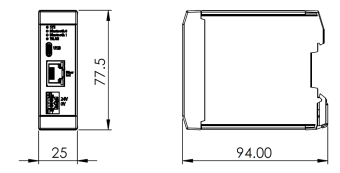
WLAN/Bluetooth Converter Exterior View
WLAN/Bluetooth Converter Exterior View
Print
Select all
Clear all
Print
Introduction
Please Read Before Use
ICD-CTU Instruction Manual Configuration
Safety Guide
Safety Precautions for Our Products
Alert Indication
Precautions for Handling
International Standard Compliance
Precautions for Handling Wireless Operation
Precautions for Axis Operation with Wireless Connection
Security Precautions
WLAN Risks
Overview
Overview
System Configuration
Names and Functions of Each Part
Names and functions of each part of Smart Web Unit
Names and functions of each part of WLAN/Bluetooth Converter
Names and functions of each part of Ethernet/RS-485 Converter
Controller Version
Teaching Tool Version
Specifications
Components
Smart Web Unit Components
WLAN/Bluetooth Converter Components
Ethernet/RS-485 Converter Components
How to Read the Model Plate
Smart Web Unit Model Plate
WLAN/Bluetooth Converter Model Plate
Ethernet/RS-485 Converter Model Plate
How to Read the Model
Smart Web Unit Model
WLAN/Bluetooth Converter Model
Ethernet/RS-485 Converter Model
List of Basic Specifications
Basic Specifications and Environmental Conditions of Smart Web Unit
Basic Specifications and Environmental Conditions of WLAN/Bluetooth Converter
Basic Specifications and Environmental Conditions of Ethernet/RS-485 Converter
External view
Smart Web Unit Exterior View
WLAN/Bluetooth Converter Exterior View
Ethernet/RS-485 Converter Exterior View
Equipped with AC adapter
AC adapter (UNXVX3024-240010SA)
AC Adapter Specifications
Installation and Protected Environment
Installation Environment
Storage and Preservation Environment
Installation and Mounting
Installation of Smart Web Unit
Installation of WLAN/Bluetooth Converter
Installation of Ethernet/RS-485 Converter
WLAN Wireless Specifications
WLAN Wireless Standards
Reference for WLAN Wireless Reachable Distance
WLAN Directivity
Bluetooth Wireless Specifications
Bluetooth Wireless Standards
Reference for Bluetooth Wireless Reachable Distance
Bluetooth Directivity
Wiring
Wiring for Smart Web Unit
Preparation Before Wiring (ICD-CTU)
Wiring Diagram (ICD-CTU)
Wiring for WLAN/Bluetooth Converter
Preparation Before Wiring (ICD-WLBT)
Configuration After Wiring (ICD-WLBT)
Wiring for Ethernet/RS-485 Converter
Preparation Before Wiring (ICD-ETSE)
Wiring Diagram (ICD-ETSE)
When Connecting Multiple Controllers (ICD-ETSE)
Parameter
Smart Web Unit Parameters
Parameter List (ICD-CTU)
Parameter Description (ICD-CTU)
Other Settings (ICD-CTU)
WLAN/Bluetooth Converter Parameters
Parameter List (ICD-WLBT)
Parameter Description (ICD-WLBT)
Other Settings (ICD-WLBT)
Ethernet/RS-485 Converter Parameters
Parameter List (ICD-ETSE)
Parameter Description (ICD-ETSE)
Maintenance and Inspection
Maintenance and Inspection of Smart Web Unit
Consumable Parts (ICD-CTU)
Maintenance Parts (ICD-CTU)
Precautions for Inspection (ICD-CTU)
Maintenance and Inspection of WLAN/Bluetooth Converter
Consumable Parts (ICD-WLBT)
Maintenance Parts (ICD-WLBT)
Precautions for Inspection (ICD-WLBT)
Maintenance and Inspection of Ethernet/RS-485 Converter
Consumable Parts (ICD-ETSE)
Maintenance Parts (ICD-ETSE)
Precautions for Inspection (ICD-ETSE)
Troubleshooting
Smart Web Unit Troubleshooting
Action to Be Taken upon Occurrence of Problem (ICD-CTU)
Fault Diagnosis (ICD-CTU)
WLAN/Bluetooth Converter Troubleshooting
Action to Be Taken upon Occurrence of Problem (ICD-WLBT)
Fault Diagnosis (ICD-WLBT)
Ethernet/RS-485 Converter Troubleshooting
Action to Be Taken upon Occurrence of Problem (ICD-ETSE)
Fault Diagnosis (ICD-ETSE)
Wireless Device Parameter Setup Tool
Overview (Wireless Device Parameter Setup Tool)
Introduction (Wireless Device Parameter Setup Tool)
Supported Languages of the Wireless Device Parameter Setup Tool
How to Install Wireless Device Parameter Setup Tool
Specifications and Preparation for the Wireless Device Parameter Setup Tool
Operating Environment for Wireless Device Parameter Setup Tool
Communication Interfaces of Wireless Device Parameter Setup Tool
Function List of the Wireless Device Parameter Setup Tool
Screen Configuration of Wireless Device Parameter Setup Tool
Application Settings of Wireless Device Parameter Setup Tool
Web Application for Smart Web Unit
Overview (Web Application for Smart Web Unit)
Introduction (Web Application for Smart Web Unit)
Supported Languages of the Web Application
How to Open a Web Application
Execution Environment and Specifications of Web Application
Execution Environment of Web Application
Maximum Number of Connected Axes for Web Application
Use of OSS (Open Source Software)
Supported Models for Web Applications
Web Application Support Functions
Web Application Screen Transitions
Transitions from Menu
Transitions from [Communication]
Transitions from [Position data]
Transitions from [Monitor]
Transitions from [Backup]
Transitions from [Maintenance]
Transitions from [Information]
Transitions from [Other]
User Authentication (Web Application for Smart Web Unit)
Initial Setup (Web Application for Smart Web Unit)
Function Description (Web Application for Smart Web Unit)
Menu
Communication
Position data
Monitor
Backup
Maintenance
Information
Other
Warranty
Warranty Period
Scope of the Warranty
Honoring the Warranty
Limited Liability
Conformance with Applicable Standards/Regulations, etc., and Application Conditions
Other Items Excluded from Warranty
Revision History
Revision History