
Application Settings of Wireless Device Parameter Setup Tool
Communication Settings
The Communication Settings tab of the Application Settings screen is shown below.
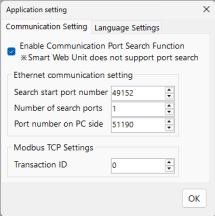
Setting Items | Remarks | |
|---|---|---|
Enable/Disable Communication Port Search | Set whether to perform port search when selecting a communication port If disabled, specify the port manually to establish communication | |
Ethernet Communication Settings | Start search port number | The starting port number for searching connection targets |
Number of search ports | The number of ports to search when detecting connection targets | |
PC side port number | The port number on the PC used during connection target search | |
Modbus TCP Settings | Transaction ID | The transaction ID used during Modbus TCP communication |