
When Connecting Multiple Controllers (ICD-ETSE)
Requisite Devices
- SIO Converter (RCB-TU-SIO-A or RCB-TU-SIO-B): 1 unit
- Controller Link Cable (CB-RCB-CTL002): Required by the number of controllers
Accessories
- 4-way junction (Manufactured by AMP 5-1473574-4): 1 unit
- e-CON Connector (Manufactured by AMP 4-1473562-4): 1 unit
- Terminal Resistance (220Ω, with a e-CON connector): 1 unit
Instead of the e-CON cable attached to the controller link cable, a terminal block may be used. In this configuration, disconnect the e-CON connector from the controller link cable.
Connection examples
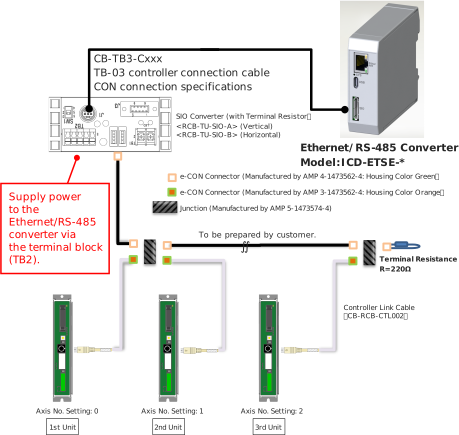
Detailed Connection Diagram of Communication Lines
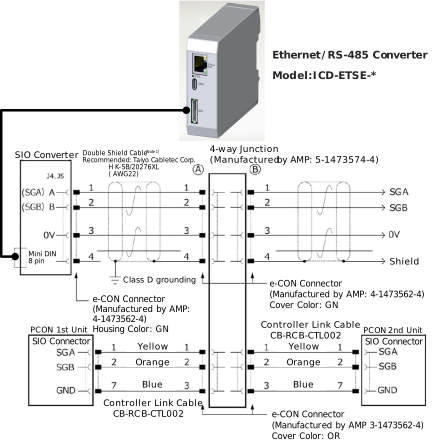
* Apply a 2-pair shielded cable.
When connecting a cable other than recommended to (A) and (B), make sure to use a hard-cored cable equivalent to the vinyl cable (KIV) dedicated for control devices with the sheath outer diameter from 1.35 to 1.60mm. Using cables with outer diameter out of the specification may cause poor contact to occur.
When connecting a cable other than recommended to (A) and (B), make sure to use a hard-cored cable equivalent to the vinyl cable (KIV) dedicated for control devices with the sheath outer diameter from 1.35 to 1.60mm. Using cables with outer diameter out of the specification may cause poor contact to occur.
Caution
- When cables with outer diameter out of the specification are used, use a terminal block instead of 4-direction junction. In this configuration, disconnect the e-CON connector of the link cable.
If an error possibly caused by poor contact occurs frequently, replace the junction with the terminal block.
Axis No. Setting
Possible axis numbers range from 0 to F by 16 axes. After configuration, reboot the controller power supply. Also, ensure that axis numbers are not duplicated.
Handling of e-CON Connector (How to Connect)
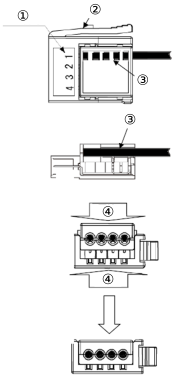
① | Pin No. |
➁ | Clamp Lever |
③ | Wire |
④ | Press welding |
- Check the applicable cable size.
Check the applicable cable. If it is not applicable, it may cause a connection failure or a breakage of the connector. - Check the pin numbers, do not reveal the sheath, and insert the cable till it reaches the end.
Revealing the sheath may cause a failure such as short circuit or cable fall out.
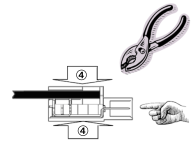
- Use a (generally purposed) parallel plier with the width of 10mm or more to press-weld the cable from top and bottom.
Use the parallel plier from the direction of image below, grip it while checking the condition of press-welding to make sure the press is in right angle and press it until it becomes completely flat to the housing.
If the inserting is not enough, it may not be able to attach to the socket or may cause a contact failure.

- After finishing the press-welding, pull the cable lightly to confirm that won’t come out.
Caution
- e-CON connector cannot be reused once the press-welding is failed. Use a new connector to retry the press-welding.
- When connecting to the socket, hold the connector with care not to touch the clamp lever, insert the connector in parallel to the socket until the clamp lever makes a “click” sound.
- After joining to the socket, do not pull the cables or pull the connector without releasing the lock of the clamp lever.
SIO Converter
The SIO converter converts the communication mode from RS-232C to RS-485 or vice versa.
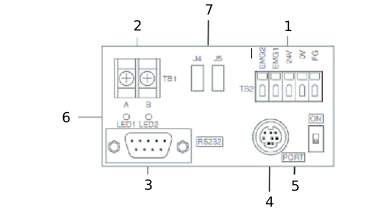
1 | Power/Emergency Stop Terminal Board (TB2) |
2 | Link-connection Terminal Board (TB1) |
3 | D-sub, 9-pin connector |
4 | Mini DIN, 8-pin connector |
5 | PORT Switch |
6 | LED Indicators for Monitoring |
7 | e-CON Connector |
- Power/Emergency Stop Terminal Board (TB2)
Symbol | Contents |
|---|---|
EMG1, EMG2 | Turn the PORT switch ON to output the emergency stop switch signal, OFF to short-circuit EMG1 and EMG2. When applying the emergency stop switch of the teaching pendant to the emergency stop of the system, obtain the signal from here. |
24V | Positive side of the 24V DC power supply (Power supply for the Ethernet/RS-485 Converter, teaching pendant and conversion circuit, etc.) |
0V | Negative side of the 24V DC power supply |
FG | Frame ground |
Note 0V is connected to the pin No. 7 (GND) on the communication connector for the controller.
- Connection method
Use a connection cable satisfying the following specifications:
Item | Specifications |
|---|---|
Applicable wire | Solid Wire : Φ0.8 to 1.2mm/Stranded : AWG Size 20 to 18 (0.5 to 0.75mm2) |
Stripped wire length | 10mm |
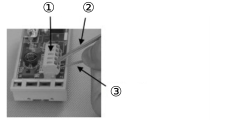
① | Use for Continuity Check |
➁ | Insert a flathead screwdriver with a bit size of approx. 2.6mm. |
③ | Connection Cable |
- Link-connection Terminal Board (TB1)
This is the connection port to obtain communication connection with the controller.
Connect terminal “A” on the left side to communication line SGA of the controller. (Terminal A is connected to pin 1 of 7 internally. (+))
Connect terminal “B” on the left side to communication line SGB of the controller. (Terminal B is connected to pin 2 of 7 internally. (-))
Use a twisted pair shielded cable for the connection of SGA and SGB to TB1. - D-sub, 9-pin connector
A connection port with the PC. (RS-232C)
It is used when the operation is conducted with using SIO communication. - Mini DIN, 8-pin connector
This connector is connected to Ethernet/RS-485 Converter, PC software, teaching pendant. - PORT Switch
The PORT switch is used to exchange enable/disable of connector 4.
Set the switch to ON if connector 4) is used or OFF if not used.
The switchover of valid/invalid on the teaching pendant is held at the same time as the emergency stop button switch signal output (between EMG1 and 2). - LED Indicators for Monitoring
LED1 : Lights/blinks while the controller sends signals.
LED2 : Lights/blinks while signals are sent from the RS-232C connector. - e-CON Connector
It is used when connecting to the controller with e-CON connector without using 2.
Communications Cable
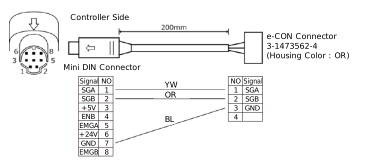
External view
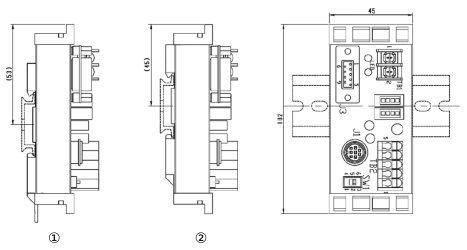
① | Leg Element Bottom Side |
➁ | Leg Element Top Side |