
Menu
On a PC browser, the menu for selecting each function is displayed in the left pane, while on mobile devices such as smartphones, it is displayed in full screen.
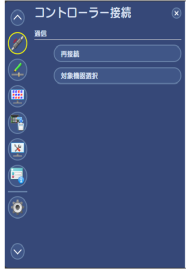
Figure 8.3 Menu (PC)
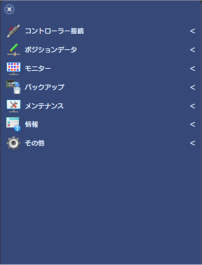
Figure 8.4 Menu (Mobile device)
To display the menu on a mobile device, tap the button located at the top left of the screen.

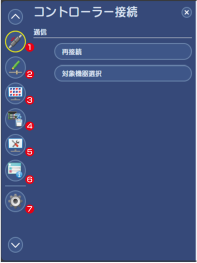
Figure 8.5 Menu (PC)
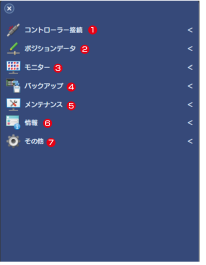
Figure 8.6 Menu (Mobile device)
- Communication
Used it to open communication-related functions. Refer to the Communication. - Position Data
Used it to open position data-related functions. Refer to the Position data. - Monitor
Used it to open monitor-related functions. Refer to the Monitor. - Backup
Used it to open Backup-related functions. Refer to the Backup. - Maintenance
Used it to open maintenance-related functions. Refer to the Maintenance. - Information
Used it to open information-related functions. Refer to the Information. - Other
Used it to open others-related functions. Refer to the Other.