
Information
Connected Controller Information (CON System)
This is the screen that displays information about the connected controller.
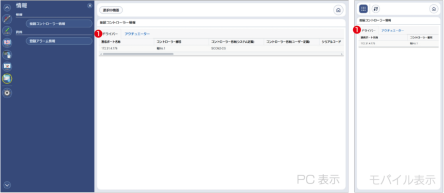
Figure 8.15 Connected Controller Information
- Display Data Switching Tab
Use it to switch whether the information display target is the driver or the actuator.
When set to Driver, in addition to the items shown in Figure 6.15, the following items are also displayed.
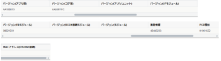
From left to right:
- Communication Port Name
- Controller Number
- Controller Name (System Definition)
- Controller Name (User Definition)
- Serial Code
- Version (Applicarion Part)
- Version (Core Part)
- Version (Absolute Unit)
- Version (I/F Module)
- Version (FB Module)
- Version (RCON Connection Module)
- Version (Module)
- Manufacturing Information
- PCB Type
- MAC Address (Ethernet Connection)
is.
The display contents when switching the display data to Actuator are as follows.

From left to right:
- Communication Port Name
- Controller Number
- Serial Code
- Version (Function)
- Inspection Date
- Slider No.
- Model
- User Memo
is.
Registered Alarm Information (CON System)
This function allows you to search and view detailed information of CON-series alarm data registered in the web application.
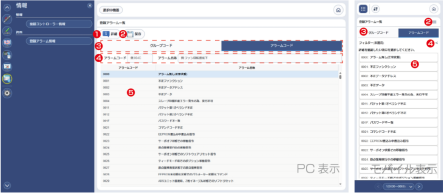
- Details Button
Press it to display the detailed screen for the alarm code or group code selected in the list in item 5.
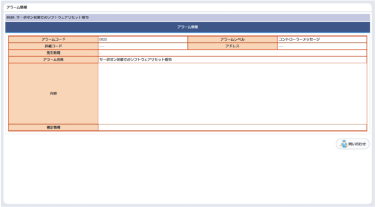
Figure 8.16 Details Display
- Save Button
Press it to save the list of alarm codes and group codes in CSV file format. - Group Code/Alarm Code Switching
Switching tabs allows you to change whether the list displays group codes or alarm codes. - Filter
The list can be narrowed down by entering an alarm code or alarm name.
Matching is based on partial match.
On mobile devices, press the < button on the right to display the input fields for filtering conditions.
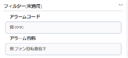
Figure 8.17 Condition Input Field (Mobile)
- Display Part
This is the area that displays the list of group codes and alarm codes.