
Communication
Reconnect
Communication with connectable controllers on the same network is to be established.
Depending on the application settings, the behavior will change between searching for connectable devices using UDP packets or establishing communication only with pre-registered IP addresses.
Depending on the application settings, the behavior will change between searching for connectable devices using UDP packets or establishing communication only with pre-registered IP addresses.
When the screen is opened, a confirmation message as shown in Figure 8.7 will be displayed. Selecting [OK] starts checking connections with controllers on the same network.
The target controllers for connection checking vary depending on whether the “communication port search function” is enabled. For details, refer to Other > Application Settings section.
The target controllers for connection checking vary depending on whether the “communication port search function” is enabled. For details, refer to Other > Application Settings section.
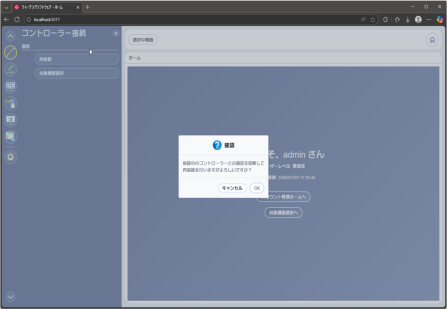
Figure 8.7 Reconnect Confirm
While establishing a connection with the controller, the screen switches to a display as shown in Figure 8.8.
Connection is established for each axis No. shown in the list, and the result and message columns are updated according to the execution results.
Refer to Table 8.1 for the legend of execution results.
Connection is established for each axis No. shown in the list, and the result and message columns are updated according to the execution results.
Refer to Table 8.1 for the legend of execution results.
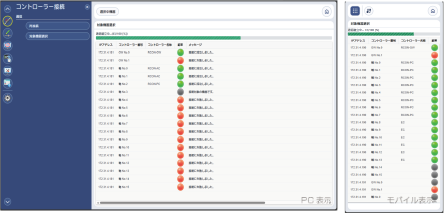
Figure 8.8 Reconnect Confirm Reconnecting
Table 8.1 Result Legend
 | Connection successful |
 | Connection failed |
 | Connection Not established |
Target Device Selection
For functions such as position data editing and monitoring, it is necessary to specify one target axis before proceeding. This screen is used to select that target axis.
Even if a target device has not been selected in advance, this screen will be displayed automatically before opening a screen that requires device selection.
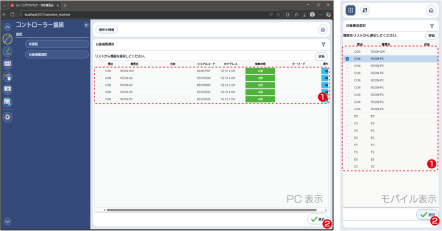
- Target Device Selection Part
Select the device you want to operate on from this table (e.g., to open position data). - [Select] Button
After selecting the target device, press this button. Pressing the button confirms the selected device.