
Configuration After Wiring (ICD-WLBT)
With the configuration after wiring, the following operations are possible:
Operation of ELECYLINDER compatible for wireless communication from a tablet or smartphone
Operation of ELECYLINDER compatible for wireless communication from dedicated PC teaching software
Operation of various controllers from the TB-03
Operation of ELECYLINDER compatible for wireless communication from dedicated PC teaching software
Operation of various controllers from the TB-03
The WLAN/Bluetooth converter supports communication via Ethernet (wired) or WLAN (wireless) to connect to the network environment of the user.
The following sections on configuration devices, required components, and connection diagrams describe the configurations after wiring, combinations of communication systems, and the necessary peripheral devices (for reference). The required peripheral devices should be prepared by the user according to the configuration of the connection diagram being used.
The following sections on configuration devices, required components, and connection diagrams describe the configurations after wiring, combinations of communication systems, and the necessary peripheral devices (for reference). The required peripheral devices should be prepared by the user according to the configuration of the connection diagram being used.
Configuration Devices, Required Components, and Connection Diagrams
Below are connection diagrams for tablet/smartphone, PC, and TB-03 cases, showing both wired and wireless connection systems.
- Operation of ELECYLINDER compatible for wireless communication from a tablet or smartphone
- Wired System
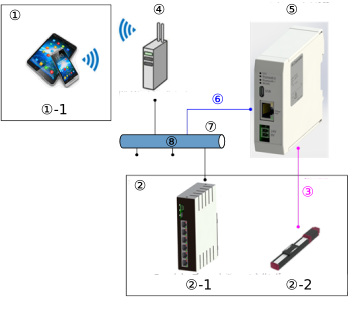
① | Device Peripheral Area | |
①-1 | Tablets and smartphones* | |
② | Equipment installation area | |
②-1 | Smart Web Unit* | Model: ICD-CTU-* |
②-2 | ELECYLINDER | Wireless communication specification/Wireless axis operation specification |
③ | Wireless communication | Bluetooth |
④ | WLAN access point | |
⑤ | WLAN/Bluetooth Converter | Model: ICD-WLBT-* |
⑥ | Ethernet cable | |
⑦ | Network connection | |
⑧ | Local area network | |
* Tablet/smartphone communicates via the Smart Web Unit equipped with a web server.
- Wireless System
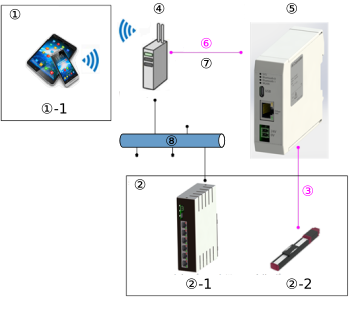
① | Device Peripheral Area | |
①-1 | Tablets and smartphones* | |
② | Equipment installation area | |
②-1 | Smart Web Unit* | Model: ICD-CTU-* |
②-2 | ELECYLINDER | Wireless communication specification/Wireless axis operation specification |
③ | Wireless communication | Bluetooth |
④ | WLAN access point | |
⑤ | WLAN/Bluetooth Converter | Model: ICD-WLBT-* |
⑥ | Wireless communication | WLAN |
⑦ | Network connection | |
⑧ | Local area network | |
* Tablet/smartphone communicates via the Smart Web Unit equipped with a web server.
- Operation of ELECYLINDER compatible for wireless communication from a PC
- Wired System
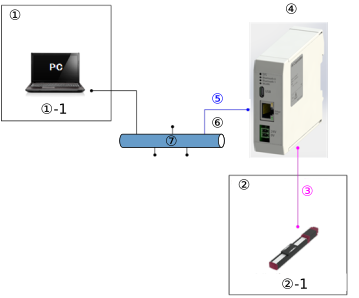
① | Device Peripheral Area | |
①-1 | PC software | IA-OS |
② | Equipment installation area | |
②-1 | ELECYLINDER | Wireless communication specification/Wireless axis operation specification |
③ | Wireless communication | Bluetooth |
④ | WLAN/Bluetooth Converter | Model: ICD-WLBT-* |
⑤ | Ethernet cable | |
⑥ | Network connection | |
⑦ | Local area network | |
- Wireless System
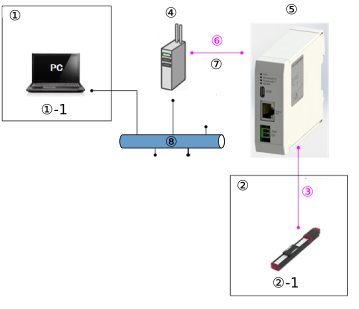
① | Device Peripheral Area | |
①-1 | PC software | IA-OS |
② | Equipment installation area | |
②-1 | ELECYLINDER | Wireless communication specification/Wireless axis operation specification |
③ | Wireless communication | Bluetooth |
④ | WLAN access point | |
⑤ | WLAN/Bluetooth Converter | Model: ICD-WLBT-* |
⑥ | Wireless communication | WLAN |
⑦ | Network connection | |
⑧ | Local area network | |
- Operation of various controllers from the TB-03
- Wired System
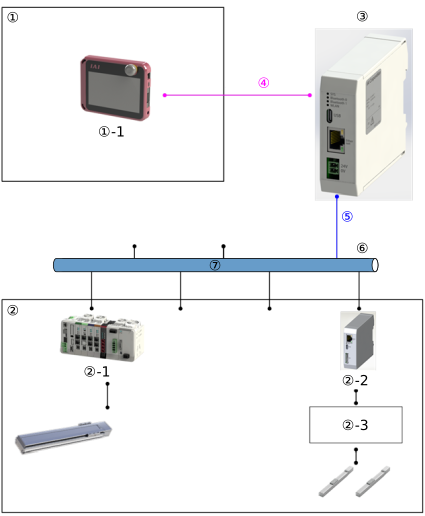
① | Device Peripheral Area | |
①-1 | TB-03 | |
② | Equipment installation area | |
②-1 | RCON | |
②-2 | Ethernet/RS-485 Converter | Model: ICD-ETSE-* |
②-3 | Single-axis and multi-axis CON system controllers | Non-Ethernet compatible model |
③ | WLAN/Bluetooth Converter | Model: ICD-WLBT-* |
④ | Wireless communication | Bluetooth |
⑤ | Ethernet cable | |
⑥ | Network connection | |
⑦ | Local area network | |
- Wireless System
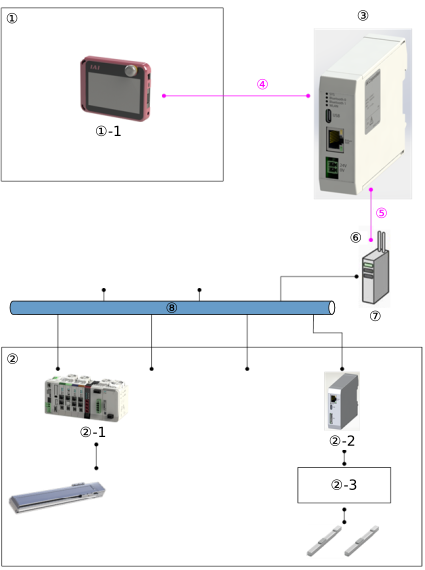
① | Device Peripheral Area | |
①-1 | TB-03 | |
② | Equipment installation area | |
②-1 | RCON | |
②-2 | Ethernet/RS-485 Converter | Model: ICD-ETSE-* |
②-3 | Single-axis and multi-axis CON system controllers | Non-Ethernet compatible model |
③ | WLAN/Bluetooth Converter | Model: ICD-WLBT-* |
④ | Wireless communication | Bluetooth |
⑤ | Wireless communication | WLAN |
⑥ | Network connection | |
⑦ | WLAN access point | |
⑧ | Local area network | |