
LED Display
Pulse Motor Equipped Models
The LED display of ELECYLINDER (pulse motor equipped models) should be as stated below.
Item | Content |
|---|---|
Controller status display (SV/ALM) | Green light ON: Servo ON Red light ON: Alarm generated or stop sent from teaching pendant Orange light ON: Under initialization of power boot (Both green & red ON) OFF: Servo OFF Green light blinking: In process of automatic servo OFF*1 Green/red alternately blinking: Maintenance warning, light malfunction alarm |
Wireless Communication Status Display (WL) | Green light blinking: Wireless connection status Red light blinking: Wireless hardware error Orange light ON: Initializing for power supply Light OFF: Wireless hardware in initializing process, wireless not connected or in connection process to TP port |
Forward end / backward end displayNote 1 | Orange light ON: Forward end / backward end, Pressing missing detection Orange light blinking: Pressing Complete |
Note 1 This feature is only applicable for the following models.
・EC-SL3□/GDB3□/T3□/GDS3L/S2□(R)/RR2□(R)/RP3□/GD3□/TC3□/TW3□
Refer to Parameter No.10: LED Lighting System Automatic Switch Setting for details.
・EC-SL3□/GDB3□/T3□/GDS3L/S2□(R)/RR2□(R)/RP3□/GD3□/TC3□/TW3□
Refer to Parameter No.10: LED Lighting System Automatic Switch Setting for details.
*1 Blinking in process of the automatic servo OFF is in frequency of 0.5Hz.
(Example)
LED display | Content |
|---|---|
The LED on the ELECYLINDER flashes red/green alternately for maintenance warnings 1 to 3. 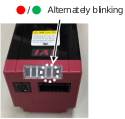 | When the total travel count has exceeded the total travel count setting (Maintenance warning 1) When the total travel distance has exceeded the total travel distance setting (Maintenance warning 2) When the overload level has exceeded the set ratio (Maintenance warning 3) |
24V AC Servomotor Equipped Models
The LED display of ELECYLINDER (24V AC servomotor equipped models) should be as stated below.
Item | Content |
|---|---|
Controller status display (SV/ALM) | Green light ON: Servo ON Red light ON: Alarm generated or stop sent from teaching pendant Orange light ON: Under initialization of power boot (Both green & red ON) Light OFF: Servo OFF Green light blinking: In process of automatic servo OFFNote 1 Green/red alternately blinking: Maintenance warning, light malfunction alarm |
Wireless Communication Status Display (WL) | Green light blinking: Wireless connection status Red light blinking: Wireless hardware error Orange light ON: Initializing for power supply Light OFF: Wireless hardware in initializing process, wireless not connected or in connection process to TP port |
Forward end / backward end display*1 | Orange light ON: Forward end / backward end, Pressing missing detection Orange light blinking: Pressing Complete |
*1 Refer to Parameter No.10: LED Lighting System Automatic Switch Setting for details.
Note 1 Blinking in process of the automatic servo OFF is in frequency of 0.5Hz.
(Example)
LED display | Content |
|---|---|
The LED on the ELECYLINDER flashes red/green alternately for maintenance warnings 1 to 3. 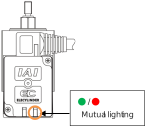 | When the total travel count has exceeded the total travel count setting (Maintenance warning 1) When the total travel distance has exceeded the total travel distance setting (Maintenance warning 2) When the overload level has exceeded the set ratio (Maintenance warning 3) |
200V AC Servomotor Equipped Models
The LED display of ELECYLINDER (200V AC servomotor equipped models) should be as described follows.
[Status display LED]
Item | Content |
|---|---|
Controller status display (SV/ALM) | Green light ON: Servo ON Red light ON: Alarm generated or stop sent from teaching pendant Red light blinking: Under initialization of power boot (Both green & red ON) Light OFF: Servo OFF Green light blinking: In process of automatic servo OFF*1 Green light blinking: Maintenance warning, light malfunction alarm*2 |
Motor power LED | Green light ON: Motor power ON Green light blinking: Motor power OFF Orange light ON: Initializing for power supply |
Wireless status display (WL) | Green light blinking: Wireless connection status Red light blinking: Wireless hardware error Orange light ON: Initializing for power supply Light OFF: Wireless hardware in initializing process, wireless not connected or in connection process to TP port |
*1 Blinking in process of the automatic servo OFF is in frequency of 0.5Hz.
*2 Blinking in the maintenance warning and the light malfunction alarm is in frequency of 1.0Hz.
[Battery charge display LED]
Display color | Content |
|---|---|
Red | The internal circuit is charged. |
Light OFF | The internal circuit is not charged. |
Warning
- Do not attempt to touch the product when the battery charge status display LED is turned on in red. You may get electrical shock. Make sure to turn the power off and to confirm that the battery charge status display LED is turned off before touching the product for such purposes inspection.