
Basic Operation
If setting parameters numerically, touch the set value .
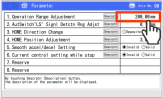
The set value will blink and Ten Key window will open.
Enter the value with the Ten Key pad and touch the ENT .
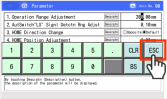
The parameter will be changed.
However, if you touch ESC , the parameter will not be changed and the edit window will return.If setting parameters with radio buttons, touch the radio buttons.
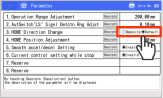
The parameter will be changed.
When all parameter changes are complete, Touch the home button:

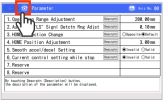
A confirmation window will appear to ask for controller reboot when a change is made to the parameters.
Touch the Yes .
The controller will restart, enabling parameter changes.
However, if you touch No , the reboot will be canceled and the Edit parameters window will return.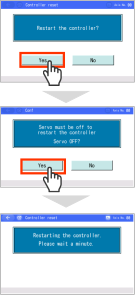
Reference
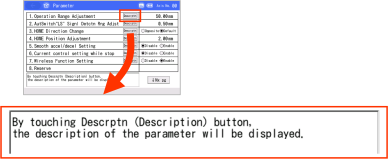
Touching the Descrptn displays a description of each parameter at the bottom of the screen.
Caution
- Simply changing the parameters alone is not sufficient to enable the changes.
- After making changes, the power must be turned off and on or a software reset performed.
After the ELECYLINDER restarts, the parameter changes will be enabled. - Do not attempt to turn OFF the power while writing the parameters. This may damage the controller.