
Stop Position Setting / Adjustment (Forward End / Backward End)
Setting item | Unit | Explanation |
|---|---|---|
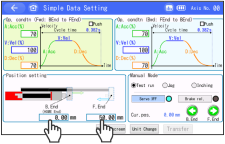
Backward end, forward end | mm | Enter as the distance from the home position. Entries can be made in increments of 0.01mm. |
Touch the position you want to configure/adjust.
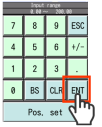
Ten Key window will open.
After setting the numerical value, touch the ENT .
Then touch the Transfer .A value will be written to the controller and the B.End and F.End will turn green.
Press the F.End or B.End to operate.
Check the results of the new setting/adjustment.
If you stop touching during operation, the moving parts will decelerate and stop from the spot.