
Parameter No.3: Change Home Return Direction
No. | Category | Name | Unit | Input range | Default setting at shipping |
|---|---|---|---|---|---|
3 | C | Home return direction change | - | Reverse, Forward | According to ELECYLINDER specifications |
- The home return operation direction can be selected.
- To set the opposite direction, switch to the opposite setting value.
("Forward" → "Reverse" or "Reverse" → "Forward") - For standard specification, the motor side is home.
(Setting example)
If "Parameter No.3" is "Forward"
If "Parameter No.3" is "Forward"
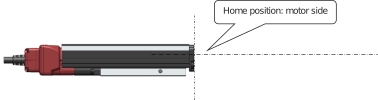
If "Parameter No.3" is "Reverse"
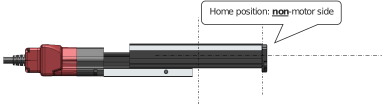
Caution
- Changing the home return direction reverses the operation direction.
- After changing this parameter, always perform home return reset (absolute reset).
- Even if the operation direction is reversed, check that the moving parts do not interfere with any other objects.
If the moving parts collide, they may damage the ELECYLINDER, workpiece or peripheral devices. - Changing the home return direction after purchasing will cause a mismatch with the ELECYLINDER model number.
Make sure to change parameters again if the controller or body is replaced.