
Parameter Edit Window
Touch Parameter edit on the Menu 1 screen.
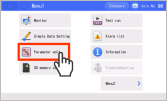
The screen will switch to the Edit parameters window.
If the TP operation mode is not Teach mode, a confirmation window will appear for switching to Teach mode.
Also, if the parameter edit password is set to a value other than "0000", the password input screen will be displayed.If the parameter edit password is set to a value other than "0000", enter the password and press the ENT on the touch panel.
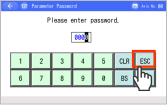
The Parameter edit window will open.
Reference
The parameter edit password is set to "0000" at shipping.
Refer to the TB-02 Instruction Manual (ME0355) , TB-03 Instruction Manual (ME0375, ME0376) for information about changing the password.
Refer to the TB-02 Instruction Manual (ME0355) , TB-03 Instruction Manual (ME0375, ME0376) for information about changing the password.