
Way of Wiring (for Connect to PIO Control / Cable)
Here the way of wiring with a power & I/O cable is introduced.
The connector on the ELECYLINDER side is to be connected to the interfacing box.
The connector on the ELECYLINDER side is to be connected to the interfacing box.
Power & I/O Cable
Power & I/O cable (User Wiring Type)
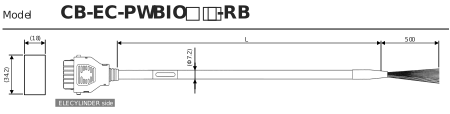
Minimum bending radius 58mm (for movable use) *Robot cable is standard for this model.
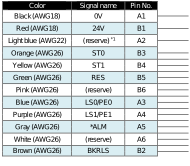
*1 TMD2 is 24V (control)
(Note) Cable in light green and light gray not in use (Already cut in shrink tube)
(Note) In the case of the single solenoid system, pin No.B3 is signal name FWBW. Pin No. B4 is not for use.
(Note) Cable in light green and light gray not in use (Already cut in shrink tube)
(Note) In the case of the single solenoid system, pin No.B3 is signal name FWBW. Pin No. B4 is not for use.
- The wiring on the opposite side of the connector has not been processed.
- The cable length is available from 1m to 10m. Specify the length (L) in increments of 1m.
- The following shows a sample model number.
Cable length 1 m | CB-EC-PWBIO010-RB |
Cable length 3 m | CB-EC-PWBIO030-RB |
Cable length 10 m | CB-EC-PWBIO100-RB |
Power & I/O cable (User Wiring Type, 4-way Connector)
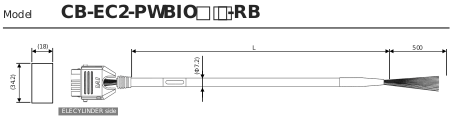
Minimum bending radius 58mm (for movable use) *Robot cable is standard for this model.
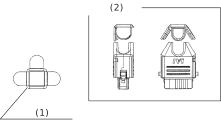
(1) | Cap for L Type Cover |
(2) | Connecter Assembly View |
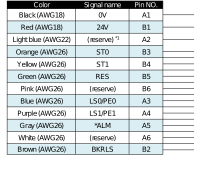
*1 TMD2 is 24V (control)
(Note) Cable in light green and light gray not in use (Already cut in shrink tube)
(Note) In the case of the single solenoid system, pin No.B3 is signal name FWBW. Pin No. B4 is not for use.
(Note) Cable in light green and light gray not in use (Already cut in shrink tube)
(Note) In the case of the single solenoid system, pin No.B3 is signal name FWBW. Pin No. B4 is not for use.
- The wiring on the opposite side of the connector has not been processed.
- The cable length is available from 1m to 10m.
Specify the length (L) in increments of 1m. - The following shows a sample model number.
Cable length 1 m | CB-EC2-PWBIO010-RB |
Cable length 3 m | CB-EC2-PWBIO030-RB |
Cable length 10 m | CB-EC2-PWBIO100-RB |
Refer to Power & I/O Cable [How to Build up 4-Way Connector Cable] for how to assemble the four-way connector.
Power & I/O Cable Connection
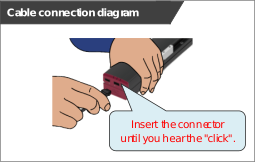
Connect the power & I/O cable.
Insert the connector until you hear the "click".
Insert the connector until you hear the "click".
Caution
- The connector must be inserted in a given direction.
Align the convex and concavity on the connectors and join them inserting until you hear the "click". - Take appropriate care to prevent unused wiring in the loose wire end on the cable from shorting out other wires by protecting them with insulation tape.
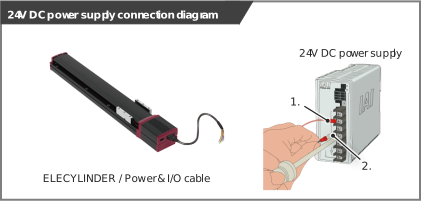
24V DC Power Supply Wiring
Connect the power wiring to the power & I/O cable.
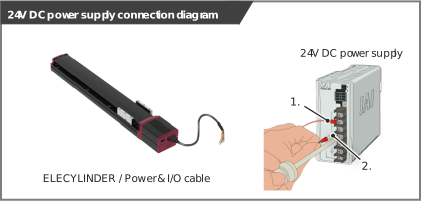
Connect the 24V DC power supply to the terminal block after terminal-processing the 24V and 0V wires of the power & I/O cable.
Connect the 24V DC power supply to the terminal block after terminal-processing the 24V and 0V wires of the power & I/O cable.
Wiring for Power Supply Standard Type
- Connect the 24V wire (insulation color: red) to the +24V terminal of the 24V DC power supply.
- Connect the 0V wire (insulation color: black) to the 0V terminal of the 24V DC power supply.
Wiring color | Signal abbreviation | Function overview | Required specifications |
|---|---|---|---|
Red | 24V | Power supply input | Control power voltage: 24V DC ±10% Control power current: 0.32A Brake power supply (for the brake option is selected): S10/S10X 0.22A (No overexcitation) S13/S13X/S15/S15X 0.875A (when in overexcitation) S18/S18X 0.753A (No overexcitation) When teaching pendant used: 0.15A |
Black | 0V | Ground |
Two-circuit power supply specification TMD2 (Option)
Connect the power wiring to the power & I/O cable.
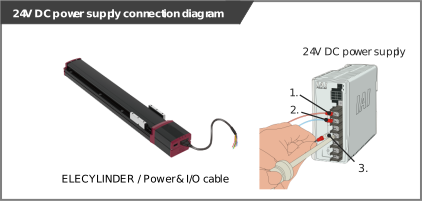
Connect the 24V DC power supply to the terminal block after terminal-processing the 24V (driving source), 24V (control) and 0V wires of the power & I/O cable.
Connect the 24V DC power supply to the terminal block after terminal-processing the 24V (driving source), 24V (control) and 0V wires of the power & I/O cable.
- Connect the 24V (driving source) wire (insulation color: red) to the +24V terminal of the 24V DC power supply.
- Connect the 24V (control) wire (insulation color: light blue) to the +24V terminal of the 24V DC power supply.
- Connect the 0V wire (insulation color: black) to the 0V terminal of the 24V DC power supply.
Wiring color | Signal abbreviation | Function overview | Required specifications |
|---|---|---|---|
Red | 24V (driving source) | Driving source power supply input | Control power voltage: 24V DC ±10% Control power current: 0.32A Brake power supply (for the brake option is selected): S10/S10X 0.22A (No overexcitation) S13/S13X/S15/S15X 0.875A (when in overexcitation) S18/S18X 0.753A (No overexcitation) When teaching pendant used:0.15A |
Light blue | 24V (control) | Control power supply input | |
Black | 0V | Ground |
Reference
By cutting off the 24V (drive source) (insulation color: red), it turns to the stop condition.
Refer to Connection Diagram [Example for Wiring ELECYLINDER and Motor Drive DC Power Supply].
Refer to Connection Diagram [Example for Wiring ELECYLINDER and Motor Drive DC Power Supply].
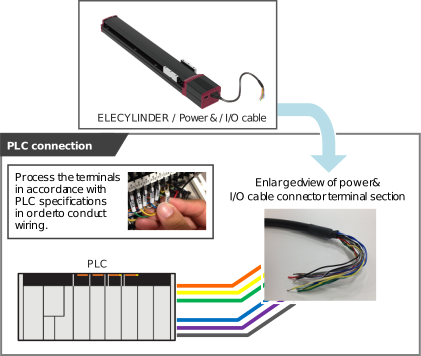
PLC Wiring
For I/O between the PLC and signals, the wiring of the power & I/O cable must be connected to the PLC.
- Connect the "orange" cable wire and the "Backward" ("Forward/Backward" for single solenoid type) output terminal.
- Connect the "yellow" cable wire and the "Forward" output terminal.
(Note) There is no need of connecting the "yellow" cable for the single solenoid type. - Connect the "green" cable wire and the "Alarm clear" output terminal.
- Connect the "blue" cable wire and the "Backward complete" input terminal.
- Connect the "purple" cable wire and the "Forward complete" input terminal.
- Connect the "gray" cable wire and the "Alarm" input terminal.
Brake Release Wiring
For the specification with brake, when installing a forcible brake release switch,Perform the wiring as shown below.
- Connect the 24V wire (insulation color: brown) to the +24V terminal of the 24V DC power supply.
- Connect the 0V wire (insulation color: black) to the 0V terminal of the 24V DC power supply.
Refer to the requirement specifications in the table below for the current amperage.
Wiring color | Signal abbreviation | Function overview | Required specifications |
|---|---|---|---|
Brown | BKRLS | Brake release | 24V DC ±10% / S10/S10X: 0.22A (No overexcitation) S13/S13X/S15/S15X : 0.875A (when in overexcitation) : 0.085A (when steady) S18/S18X: 0.753A (No overexcitation) |