
Pressing Operation Setting
Caution
- The models equipped with the 200V AC servomotor and Belt type (EC-B6/B7/B8) should not be applicable for the pressing operation.
Setting item | Unit | Explanation |
|---|---|---|
Pressing starting point | [mm] | The position where pressing operation starts. Enter as the distance from the home position. Entries can be made in increments of 0.01mm. |
Pressing force | [%] or [N] | The current limit value during the pressing operation. Touch the Unit Change to switch the units to [N], allowing entries to be made in increments of 0.01N. |
The pressing speed may vary depending on models. If "V: Velocity" is set to pressing velocity or below, pressing will take place at the speed of "V: Velocity". |
Caution
- The pressing force displayed in newton [N] serves as a guideline.
Refer to instruction manual for each ELECYLINDER, Chapter 1 Specifications for reference of pressing force. - When the pressing speed is 20mm/s or less, the pressing force will become unstable,
and failure to operate normally is possible.
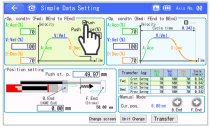
Check "Push".
The screen will switch to the pressing operation window.
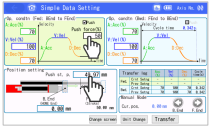
Select "Pressing Force" and "Pressing Start Point" and set the values.
Ten Key window will open.
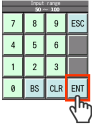
After setting the numerical value, touch the ENT .
The screen will switch to the Simple Data Setting window.
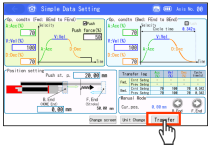
Touch the Transfer .
The numerical values will be written to the controller. The B.End and F.End will turn green.
Press the F.End or B.End to operate.
Check the results of the new setting/adjustment.