Interface Box Installation and Wiring
Precautions for interface box installation
The interfacing box is to be used for the pulse motor type ELECYLINDER in the dust and splash proof type or ELECYLINDER for interface separate type. Refer to System Construction of Pulse Motor Equipped Models for the applicable models of dust and splash proof type and interface separate type.
- When the PIO control is to be performed on the ELECYLINDER for interface separate type, it is necessary to have an interface box connected.
Connection to an interface box is also necessary when performing wireless connection in RCON-EC connection type. - IAs there is no dust and splash proof function in the interfacing box, pay attention not to have it exposed to water or dust.
- The interface box can be mounted on two body surfaces.
(Interface box orientation is irrelevant)
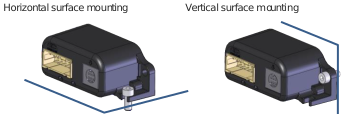
- When mounting the interface box on a vertical surface, prepare a cable pass-through hole of Φ18mm or more for the actuator cable.
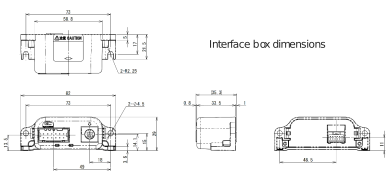
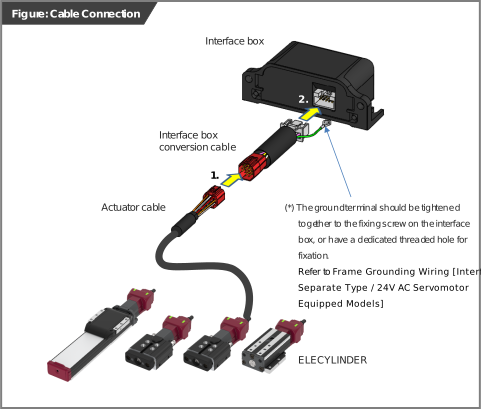
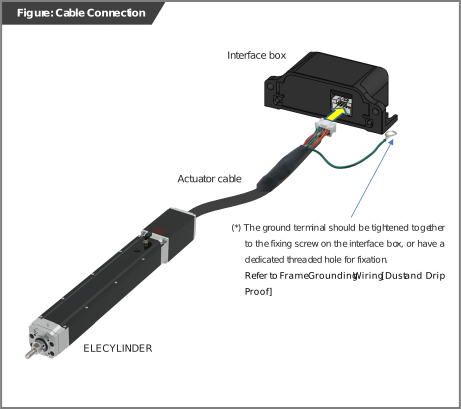
- The solderless ring tongue terminal (0.5-5 R type) on the actuator cable (ELECYLINDER in dust and splash proof type) or the interfacing box conversion cable (interface separate type) should be fixed at a position where it can be used as a FG (frame grounding).
(Fasten jointly with the interface box fixing bolt, or fix with a dedicated screw holes)
For details, refer to Frame Grounding Wiring. - Install the wireless specification interface box so that it is not separated from the touch panel teaching pendant by metal panels, etc. Obstacles of this kind may adversely affect wireless communication.
Interface Box
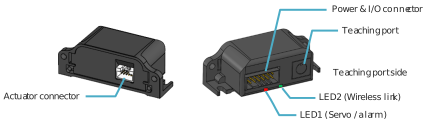
●Actuator connector
It is a connector to join an actuator.
Direct connection to the actuator cable is not available. Use the enclosed interface box conversion cable to connect the interface box.
Direct connection to the actuator cable is not available. Use the enclosed interface box conversion cable to connect the interface box.
●Status indicator LED
It is LED1 (Servo/Alarm) on the right side from the view of teaching port side that shows the ON/OFF status of the servo and the status of alarm generated, and LED2 (Wireless) on the left to show the wireless status.
For the details of display states, refer to Troubleshooting Diagnosis (for Models with Pulse Motor Equipped) or Troubleshooting Diagnosis (for Models with 24V AC Servomotor Equipped).
For the details of display states, refer to Troubleshooting Diagnosis (for Models with Pulse Motor Equipped) or Troubleshooting Diagnosis (for Models with 24V AC Servomotor Equipped).
●Teaching port
This connector is for the connection of a teaching pendant or PC teaching software.
When connecting, remove the cap.
When connecting, remove the cap.
●Power & I/O connector
This connector connects power and I/O wiring.
Interface Box Wiring
Wiring between Dust and Splash Proof Type ELECYLINDER and Interfacing Box
Connect the actuator cable and interface box.
Wiring of interface separate type ELECYLINDER and interface box
Use the interface box conversion cable for wiring between the interface box and the actuator cable.
- Join the actuator cable to the interface box conversion cable.
- Join the interface box conversion cable to the interface box.