
Parameter No.10: LED Lighting System Automatic Switch Setting
No. | Category | Name | Unit | Input range | Default setting at shipping |
|---|---|---|---|---|---|
10 | A | LED lighting system automatic switch setting | - | Disabled, Enabled | Disabled |
- The ELECYLINDER shown in the table below is capable of adding a display of such as forward end / backward end just like an automatic switch on an air-cylinder to the LED.
Type | Model |
|---|---|
Slider type | EC-S2□/S2□R, EC-SL3□ |
Rod type | EC-GDB3□/RP3□/GD3□/CRP3□/CRP5□/ CGD3□/CGD5□ |
Radial cylinder | EC-RR2□/RR2□R |
Table type | EC-T3□/TC3□/TW3□/CTC3□/CTC5□ |
Stopper Cylinder | EC-GDS3L |
- Set it to "Disable (default setting on delivery from factory)" and the ordinary status LED display (servo-on/off, emergency stop, alarms, wireless status, etc.) should be performed.
- Set it to "Enable" and "Forward End / Backward End", "Pressing Complete" and "Miss- Pressing Detected" should be shown in addition to the ordinary status LED displays.
Example of EC-SL3□
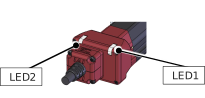
Set it to "Disable"
LED2 | LED1 | color | Operation status |
|---|---|---|---|
× | × | - | Power OFF |
Servo OFF | |||
● | ● | Orange | In Initializing at Startup |
★ | × | Green | In Wireless Connection |
★ | × | Red | Wireless Hardware Error |
× | ● | Red | Alarm |
× | In Emergency Stop | ||
× | ★⇔★ | Green, Red | Minor malfunction alarm |
× | ● | Green | Servo ON |
× | ★ | Green | In process of automatic servo OFF |
● : Light ON, ★ : Blinking, × : Light OFF
Example of EC-CRP3□
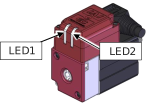
Set it to "Enabled"
LED2 | LED1 | color | Operation status |
|---|---|---|---|
In addition to LED displays in "Disable", following displays are to be added. | |||
● | × | Orange | Backward End [LS0] |
× | ● | Orange | Forward End [LS1] |
★ | × | Orange | Pressing Complete in Backward End Direction [PE0] |
× | ★ | Orange | Pressing Complete in Forward End Direction [PE1] |
● | × | Orange | Miss-Pressing Detected in Backward End Direction |
× | ● | Orange | Miss-Pressing Detected in Forward End Direction |
● : Light ON, ★ : Blinking, × : Light OFF
Caution
- This feature is available only for the target models listed on the previous page. This feature is not available for use for other models of ELECYLINDER.
- When Connecting Interface Box:
The LED display on the interface box should be the one in "Disable" regardless of the parameter setting. - Settings of "Enable" should not be reflected while in wireless connection.