
Way of Wiring (for Connect to PIO Control / Cables)
Here the way of wiring with a power & I/O cable is introduced.
The connector on the ELECYLINDER end should be connected to the interface box.
The connector on the ELECYLINDER end should be connected to the interface box.
Power & I/O cable
Power & I/O cable (user wiring specification)
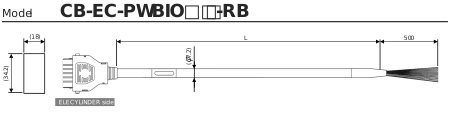
Minimum bending radius 58mm (for movable use) * Robot cable specification is standard for this model.
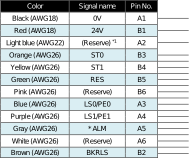
*1 TMD2 is 24V (control)
(Note) Cable in light green and light gray not in use. (Already cut in shrink tube)
(Note) In the case of the single solenoid system, pin No.B3 is signal name FWBW. Pin No. B4 is not for use.
(Note) Cable in light green and light gray not in use. (Already cut in shrink tube)
(Note) In the case of the single solenoid system, pin No.B3 is signal name FWBW. Pin No. B4 is not for use.
- The wiring on the opposite side of the connector has not been processed.
- The cable length (L) is available from 1m to 10m. Specify the length in increments of 1m.
- The following shows a sample model number.
Cable length 1 m | CB-EC-PWBIO010-RB |
Cable length 3 m | CB-EC-PWBIO030-RB |
Cable length 10 m | CB-EC-PWBIO100-RB |
Power & I/O cable (user wiring specification, 4-way Connector)
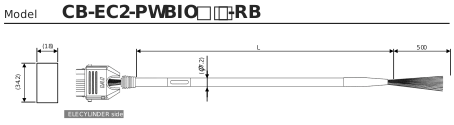
Minimum bending radius 58mm (for movable use) * Robot cable specification is standard for this model.
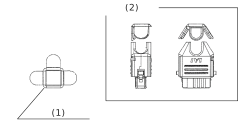
(1) | L Type Cover Cap |
(2) | Connector assembly drawing |
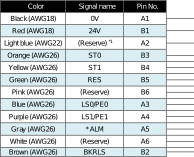
*1 TMD2 is 24V (control)
(Note) Cable in light green and light gray not in use. (Already cut in shrink tube)
(Note) In the case of the single solenoid system, pin No.B3 is signal name FWBW. Pin No. B4 is not for use.
(Note) Cable in light green and light gray not in use. (Already cut in shrink tube)
(Note) In the case of the single solenoid system, pin No.B3 is signal name FWBW. Pin No. B4 is not for use.
- The wiring on the opposite side of the connector has not been processed.
- The cable length (L) is available from 1m to 10m. Specify the length in increments of 1m.
- The following shows a sample model number.
Cable length 1 m | CB-EC2-PWBIO010-RB |
Cable length 3 m | CB-EC2-PWBIO030-RB |
Cable length 10 m | CB-EC2-PWBIO100-RB |
Refer to Power & I/O Cable [How to Build up 4-Way Connector Cable] for how to assemble the four-way connector.
Power & I/O Cable Connection
Connect the power & I/O cable to ELECYLINDER or interface box.
Insert the connector until you hear the "click".
Insert the connector until you hear the "click".
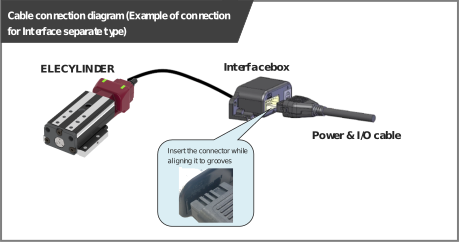
(*) Refer to Interface Box Installation and Wiring [Interface Box Wiring] for how to establish connection between ELECYLINDER and interface box.
Caution
- The connector must be inserted in a given direction.
Align the convex and concavity on the connectors and insert it until you hear the "click". - Take appropriate care to prevent unused wiring in the loose wire end on the cable from shorting out other wires by protecting them with insulation tape.
24V DC Power Supply Wiring
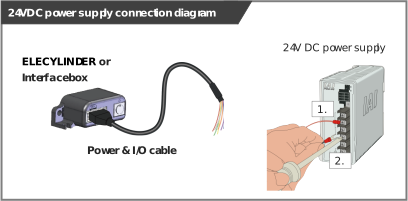
Connect the power wiring to the power & I/O cable.
Connect the 24V DC power supply to the terminal block after terminal-processing the 24V and 0V wires of the power & I/O cable.
Connect the 24V DC power supply to the terminal block after terminal-processing the 24V and 0V wires of the power & I/O cable.
Wiring for Power Supply Standard Type
- Connect the 24V wire (insulation color: red) to the +24V terminal of the 24V DC power supply.
- Connect the 0V wire (insulation color: black) to the 0V terminal of the 24V DC power supply.
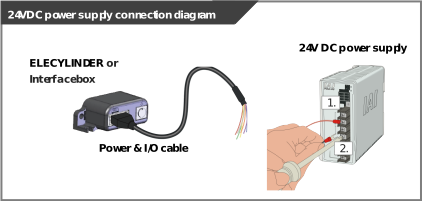
Wiring color | Signal abbreviation | Function overview | Required specifications |
|---|---|---|---|
Red | 24V | Power supply input | Power supply voltage: 24V DC ±10% Power capacity: Depends on Used Model Refer to Power Supply Current. Wiring length: 10m max (The models to use an interface box are total of actuator cable + power & I/O cable is 10m max) |
Black | 0V | Ground |
Reference
- When establishing an external stop switch, add a b-contact switch to the "B1" terminal wiring. By cutting off the power supply of 24V (driving source), it should turn into the stop state (drive power supply off).
2-circuit power supply specification TMD2 (Option)
Connect the power wiring to the power & I/O cable.
Connect the 24V DC power supply to the terminal block after terminal-processing the 24V (Driving Source), 24V (Control) and 0V wires of the power & I/O cable.
Connect the 24V DC power supply to the terminal block after terminal-processing the 24V (Driving Source), 24V (Control) and 0V wires of the power & I/O cable.
- Connect the 24V (Driving Source) wire (insulation color: red) to the +24V terminal of the 24V DC power supply.
- Connect the 24V (Control) wire (insulation color: light blue) to the +24V terminal of the 24V DC power supply.
- Connect the 0V wire (insulation color: black) to the 0V terminal of the 24V DC power supply.
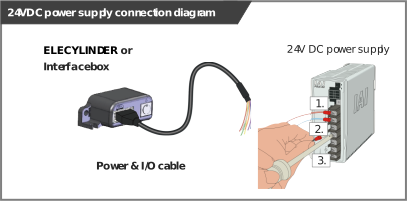
Wiring color | Signal abbreviation | Function overview | Required specifications |
|---|---|---|---|
Red | 24V (Driving Source) | Driving Source Power supply input | Power supply voltage: 24V DC ±10% Power capacity: Depends on Used Model Refer to Power Supply Current. Wiring length: 10m max (The models to use an interface box are total of actuator cable + power & I/O cable is 10m max) |
Light Blue | 24V (Control) | Control Power supply input | |
Black | 0V | Ground |
Reference
- When establishing an external stop switch, add a b-contact switch to the "B1" terminal wiring. By cutting off the power supply of 24V (driving source), it should turn into the stop state (drive power supply off).
Wiring of Drive Cutoff Switch in Order to Make Stop
There is only one way to make ELECYLINDER stop with an external switch, which is to cut off the driver power source.
By setting an external switch on the +24V power supply line for the drive power source, ELECYLINDER can be stopped.
By setting an external switch on the +24V power supply line for the drive power source, ELECYLINDER can be stopped.
Even though there is a stop switch on a teaching pendant, there is no such stop switch equipped in the PC teaching software.
In order to have a work such as teaching, it is necessary to have a drive cutoff switch externally.
For an example of wiring, refer to the Way of Wiring (for Connect to PIO Control / Connector) [Wiring of Drive Cutoff Switch in Order to Make Stop].
In order to have a work such as teaching, it is necessary to have a drive cutoff switch externally.
For an example of wiring, refer to the Way of Wiring (for Connect to PIO Control / Connector) [Wiring of Drive Cutoff Switch in Order to Make Stop].
PLC Wiring
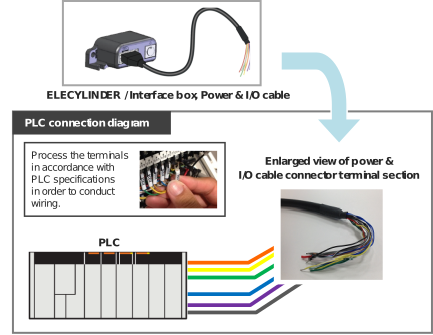
For I/O between the PLC and signals, the wiring of the power & I/O cable must be connected to the PLC.
Connect the 1. to 6. wiring to the PLC terminal block while referring to the connection diagram.
Connect the 1. to 6. wiring to the PLC terminal block while referring to the connection diagram.
- Connect the "orange" cable wire and the "Backward" ("Forward/Backward" for single solenoid system) output terminal.
- Connect the "yellow" cable wire and the "Forward" output terminal.
(Note) There is no need of connecting the "yellow" cable for the single solenoid system. - Connect the "green" cable wire and the "Alarm clear" output terminal.
- Connect the "blue" cable wire and the "Backward complete" input terminal.
- Connect the "purple" cable wire and the "Forward complete" input terminal.
- Connect the "gray" cable wire and the "Alarm" input terminal.
Brake Release Wiring
For the specification with brake, when installing a forcible brake release switch, connect the "brown" cable wire.
It is not necessary to layout cables when the ELECYLINDER is not equipped with a brake or when it is not required to have the compulsory brake release.
Power capacity of 24V DC ±10% / 200mA or higher is required.
It is not necessary to layout cables when the ELECYLINDER is not equipped with a brake or when it is not required to have the compulsory brake release.
Power capacity of 24V DC ±10% / 200mA or higher is required.
- Connect the cable on BKRLS (color: brawn) to the +24V terminal on the 24V DC power supply.
- Connect the 0V cable (color: black0 to the 0V terminal on the 24V DC power supply.
Wiring color | Signal abbreviation | Function overview | Required specifications |
|---|---|---|---|
Brown | BKRLS | Brake release | 24V DC ±10% / 200mA or higher |