
DC Power Supply for Motor Drive Wiring
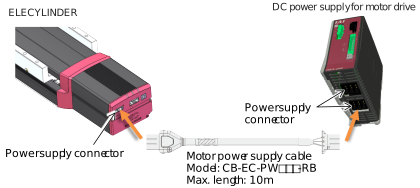
In addition to the 24V power supply for control, it is necessary to connect the DC power supply for the motor drive for the 200V AC servomotor equipped models of ELECYLINDER. Shown below is an example of wiring.
Power Supply Connector Wiring

Name | Model number | Quantity |
|---|---|---|
Power supply connector | MSTB2.5/6-STF-5.08 (Phoenix Contact) | 1 |
Follow the processes below to set up a connectivity of power supply cables for 100V AC or 200V AC.
- Loosen the terminal screw with using such as a slotted screwdriver to open up the inlet.
- Reveal the sheath for 7mm on the cable tip that satisfies the cable diameter complies the specification shown in the table below and put it in the inlet.
- Tighten the terminal screw with using such as a slotted screwdriver, to affixes the wire.
- Connect all the wires in the same manner and insert the enclosed connector to the power supply connector.
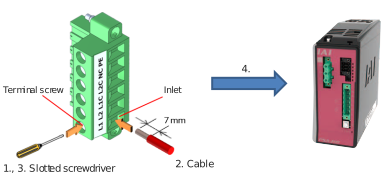
Pin No. | Connector labeled name | Contents | Applicable cable diameter |
|---|---|---|---|
1 | L1 | Motor AC power input | KIV2.0mm2(AWG14) |
2 | L2 | ||
3 | L1C | Control AC power input | KIV0.75mm2(AWG18) |
4 | L2C | ||
5 | NC | Unconnected | - |
6 | PE | Protective ground line | KIV2.0mm2(AWG14) |
Connectivity Between ELECYLINDER and DC Power Supply for Motor Drive
Set up a connectivity between ELECYLINDER and motor drive DC power supply using the motor power supply cable CB-EC-PW□□□-RB.
As the motor drive DC power supply is capable for connection of six axes, there are six connectors prepared.
As the motor drive DC power supply is capable for connection of six axes, there are six connectors prepared.
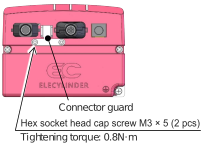
[Connector guard] (Enclosed on Delivery)
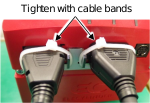
As the cables equipped with a connector guard, a risk of them getting pulled out can be prevented.
When pulling out the connector, insert a thin tool in a gap between the connector guard and the connector to hold the locking feature, hold the other side at the same time and then pull it out.
As the cables equipped with a connector guard, a risk of them getting pulled out can be prevented.
When pulling out the connector, insert a thin tool in a gap between the connector guard and the connector to hold the locking feature, hold the other side at the same time and then pull it out.
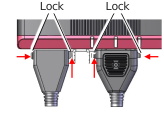
Push in a thin tool to a gap between the connector guard and the locking feature to hold the locking features on two sides and then pull out the connector.
Also, by tightening the matching parts of the connector guards and the connectors with a cable band, concern of contact error at the connectors caused by vibration on the cables can be reduced.
Regenerative Resistor Unit
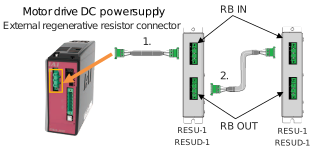
Connect regenerative resistor unit (s) with attached cables as shown in the figure below.
- When connecting 1 unit : Connect RESU(D)-1 with the enclosed cable (CB-ST-REU)
- When connecting 2 or more units : Connect RESU(D)-1 with the enclosed cable (CB-ST-REU)
[Wiring Image]
[Specifications of external regenerative resistor connector]
Item | Items and Model | |
|---|---|---|
Connector name | External regenerative resistor connector (RB) | |
Model | Controller side: GIC2.5/3-GF-7.62 | Cable side: GIF2.5/3-STF-7.62 |
[Pin assignment]
Pin No. | Signal Name | Items | Remark |
|---|---|---|---|
1 | RB+ | Regeneration resistor+ (Motor drive DC voltage) | Dedicated cable is enclosed to regenerative resistor unit |
2 | RB- | Regeneration resistor- | |
3 | PE | Ground terminal |
◆Regenerative resistor unit connection cable (CB-ST-REU□□□) □□□ indicates the cable length
5m at Max. (Example) 010 = 1m
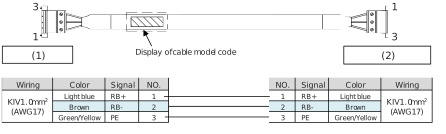
(1) | Controller side |
(2) | Regenerative resistor unit side |