
Automatic Servo OFF Function
With automatic servo OFF function, the servo turns OFF automatically after a certain period of time once (delay time) positioning is completed.
Conduct the next movement command input and the servo should turn on automatically and the positioning operation should be executed.
Since holding current does not flow during the stop, power consumption can be reduced.
When it is necessary to have the pressing operation performed, do not set up Automatic Servo OFF Function.
Once ST Signal turns off after the pressing completed, Automatic Servo OFF Function should be activated and the servo gets turned off.
IA-OS : Ver.12.00.02.00 or later
TB-02 : Ver.4.00 or later
TB-03 : Ver.4.00 or later
* The digital speed controller teaching and remote speed controller are not applicable for this function.
Refer to PC Teaching Software IA-OS First Step Guide (ME0391) for how to install, connect and start up IA-OS.
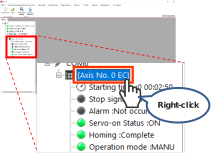
Right-click Axis No.0 EC in the status box in the IA-OS main screen.
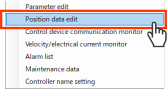
Click Position data edit from the displayed menu.
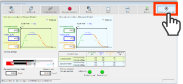
●The simple data setup screen should be displayed.
Click Automatic servo-off on the simple data setup screen.
●The Automatic servo-off setting screen should be displayed.
Set the duration from the time after positioning complete until Automatic servo OFF, the Automatic servo-off setting screen.
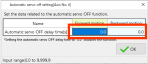
●Input for both the way forth (forward) and the way back (backward).
●The Automatic servo OFF delay time can be set in unit of 0.1 second.
Input the Automatic servo OFF delay time, and click OK .
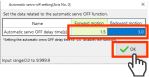
●Set it to "0.0" and this function will inactivated. (The servo will not turn off.)
Once the confirmation screen for transfer to the controller appears, click OK .
Once the transfer is completed, click OK .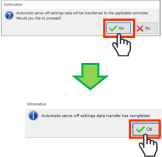
Once the execution confirmation window for the software reset appears, click Yes .
Once the software reset is completed, click OK .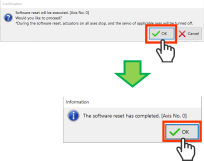
Caution
- Changing parameters only should not enable the changes made.
- Conduct reboot of the power or software reset after a change is made.
After ELECYLINDER is started up, the parameter changes should become enable. - Do not attempt to turn the power off during the setting transfer.
Doing so may damage the controller. - Do not use Automatic servo OFF with push-motion operation. When the pressing operation is conducted, it should be effective only when the pressing is missed (operation complete without touching subject = same condition as completion when positioning).
- There is no holding torque during Automatic servo OFF. The actuator will move if external force is applied. Take extra care when setting. Pay attention to interference and safety when setting up.
- Automatic servo OFF does not function if operating in teaching mode with PC software.