
Way of Wiring (for Connect to PIO Control / Connector)
Here the way of wiring with a power & I/O connector is introduced.
It should be enclosed when "0" is indicated in the model code for the cable length. The connector should be connected to the interface box.
It should be enclosed when "0" is indicated in the model code for the cable length. The connector should be connected to the interface box.
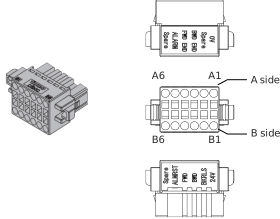
Name | Model | Quantity |
|---|---|---|
Power & I/O connector | 1-1871940-6 (Tyco Electronics) | 1 |
Pin No. | Signal name | Function |
|---|---|---|
A1 | 0V | Ground |
A2 | Reserve (CP : 2-circuit power supply specification) | Reserve (When 2-circuit power supply specification, 24V for control power supply) |
A3 | Backward complete | Backward complete (During pressing operation / Pressing complete 0) |
A4 | Forward complete | Forward complete (During pressing operation / Pressing complete 1) |
A5 | Alarm | Alarm output |
A6 | Reserve | Reserve |
B1 | 24V (MP: 2-circuit power supply specification) | 24V power supply (When 2-circuit power supply specification, 24V for motor power supply) |
B2 | Brake release | Brake release input |
B3 | Forward | Forward command |
B4 | Backward | Backward command |
B5 | Alarm clear | Alarm clear signal input |
B6 | Reserve | Reserve |
Connector Wiring Method
The name of each terminal is affixed to the power & I/O connector.
The connector nameplate name and pin number relationship is as below.
The connector nameplate name and pin number relationship is as below.
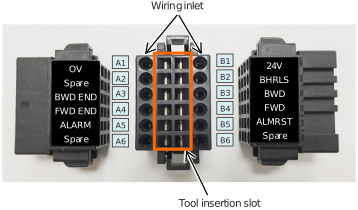
◆Preparation
- Precision screwdriver
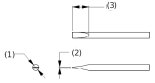
Recommended precision screwdriver
Item | Specification |
|---|---|
(1) Shaft diameter | 1.6±0.03mm |
(2) Blade thickness | 0.2±0.1mm |
(3) Tip angle length | 4.2±0.2mm |
- Wiring
Compatible wire diameter: KIV0.75mm2 (AWG18)
◆How to Conduct Wiring
Peal the sheath for 7mm and twist the core wires lightly.

Insert a precision screwdriver fully into the tool insertion slot.
Press the spring within the connector down.Insert the core wire.
Pull out the precision screwdriver.
Confirm that the cable is not pulled out.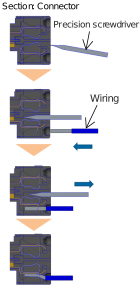
Caution
- Take care not to twist the core wire too far. This will reduce the retention force, causing the wire to fall out of the connector and possibly causing insufficient current or short circuit.
- Do not insert the precision screwdriver violently into the connector, or twist it hard. This may damage the connector housing and internal spring
- If an electric wire thinner than the applicable diameter or wiring longer than 10m is used, insufficient current may trigger an alarm and the performance of the ELECYLINDER may be degraded.
24V DC Power Supply Wiring
Wiring for Power Supply Standard Type
Connect the power wiring to the power & I/O connector.
Connect the 1. and 2. wiring to the connector terminal block while referring to the connection diagram.
Connect the 1. and 2. wiring to the connector terminal block while referring to the connection diagram.
- Connect the "B1" connector terminal and the +24V terminal of the 24V DC power supply.
- Connect the "A1" connector terminal and the 0V terminal of the 24V DC power supply.
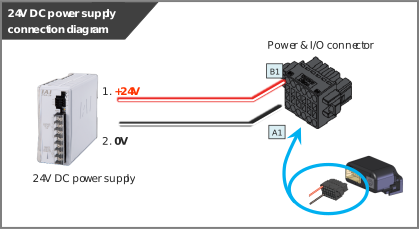
Pin No. | Connector nameplate name | Compatible wire diameter | Required specifications |
|---|---|---|---|
B1 | 24V | KIV0.75mm2 (AWG18) | Power supply voltage: 24V DC ±10% Power current: Depends on Used Model Refer to Power Supply Current. Wiring length: 10m max (The models to use an interface box are total of actuator cable + power & I/O cable is 10m max) |
A1 | 0V |
Reference
- When establishing an external stop switch, add a b-contact switch to the "B1" terminal wiring. This shuts off the 24V (driving source) power supply in the stopped state (control/drive power OFF).
2-circuit power supply specification TMD2 (Option) wiring
Connect the power wiring to the power & I/O connector.
Connect the 1. to 3. wiring to the connector terminal block while referring to the connection diagram.
Connect the 1. to 3. wiring to the connector terminal block while referring to the connection diagram.
- Connect the "B1" connector terminal and the +24V (Driving Source) terminal of the 24V DC power supply.
- Connect the "A2" connector terminal and the +24V (Control) terminal of the 24V DC power supply.
- Connect the "A1" connector terminal and the 0V terminal of the 24V DC power supply.
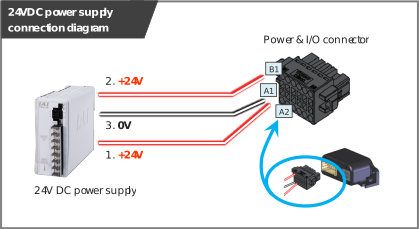
Pin No. | Connector nameplate name | Compatible wire diameter | Required specifications |
|---|---|---|---|
B1 | 24V (Driving Source) | KIV0.75mm2 (AWG18) | Power supply voltage: 24V DC ±10% Power capacity: Depends on Used Model Refer to Power Supply Current. Wiring length: 10m max (The models to use an interface box are total of actuator cable + power & I/O cable is 10m max) |
A2 | 24V (Control) | ||
A1 | 0V |
(Note) Wire for 24V (control) on A2 can apply 0.3mm2 (AWG22).
It is recommended to use a device permitted by Electrical Appliances and Materials Safety Act.
It is recommended to use a device permitted by Electrical Appliances and Materials Safety Act.
Reference
- When establishing an external stop switch, add a b-contact switch to the "B1" terminal wiring. This shuts off the 24V (driving source) power supply in the stopped state (control/drive power OFF).
Wiring of Drive Cutoff Switch in Order to Make Stop
When ELECYLINDER is to be stopped with an external switch, the motor drive source should be cut off.
By setting an external switch on the +24V power supply line for the drive power source, ELECYLINDER can be stopped.
Even though there is a stop switch on a teaching pendant, there is no such stop switch equipped in the PC software.
In order to have a work such as teaching, it is necessary to have a drive cutoff switch externally.
By setting an external switch on the +24V power supply line for the drive power source, ELECYLINDER can be stopped.
Even though there is a stop switch on a teaching pendant, there is no such stop switch equipped in the PC software.
In order to have a work such as teaching, it is necessary to have a drive cutoff switch externally.
Here shows an example of having a cutoff of the power supply on one unit of ELECYLINDER.
(*) Unless it is TMD2 type (option), the control power supply to a controller should turn off at the same time as the drive power supply. When cutting off the control power supply is not desired, select TMD2 with 2-circuit power supply specification (option).
(*) Unless it is TMD2 type (option), the control power supply to a controller should turn off at the same time as the drive power supply. When cutting off the control power supply is not desired, select TMD2 with 2-circuit power supply specification (option).
Caution
- When the power supply is conducted with turning on/off the 24V DC, keep the 0V connected, and have the +24V supplied/cut off (cutoff on one end).
Shutting power supply on the both ends may make the electric potential unstable when the power gets cut on the 0V end first.
This may cause malfunction of components inside the controller. - Make sure to secure 1second or more after shutting off the power supply before rebooting.
- Do not attempt to supply only the motor power supply while there is no control power supply.
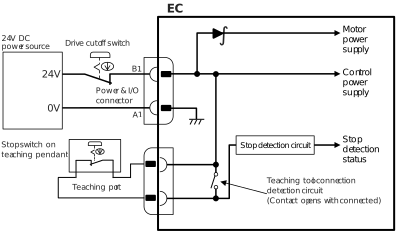
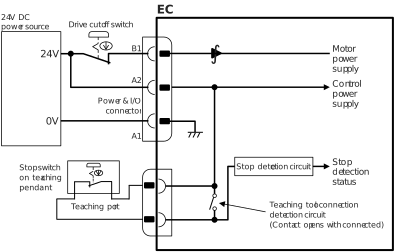
Example of circuit: For case without TMD2 with 2-circuit power supply specification
●Standard / High rigidity (PowerCON Equipped Models)
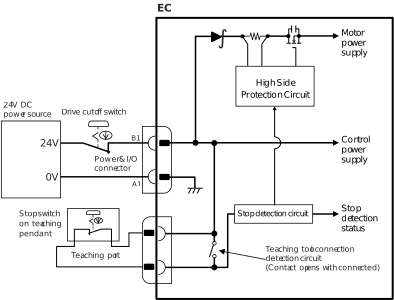
●Slim, compact / Ultra Mini / High Thrust (Models Not Equipped with PowerCON)
Example of Circuit: For Case with TMD2 with 2-circuit power supply specification
●Standard / High rigidity (PowerCON Equipped Models)
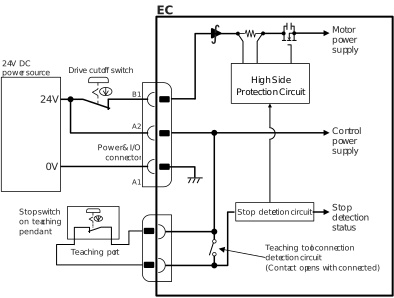
●Slim, compact / Ultra Mini / High Thrust (Models Not Equipped with PowerCON)
Way of wiring
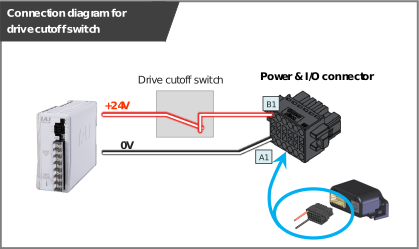
When wiring the power supply connection on the power & I/O connectors, refer to the connection diagram to connect the drive cut off switch to the power supply line (wiring of "B1" Terminal) for +24V.
By cutting off the power supply of 24V, it should turn into the stop state (control/drive power supply off, drive power supply off for TMD2).
By cutting off the power supply of 24V, it should turn into the stop state (control/drive power supply off, drive power supply off for TMD2).
◆Stop switch
- Dry contact (b-contact)
- Refer to the requirement specifications in the table below for the current amperage
Pin No. | Connector nameplate name | Compatible wire diameter | Required specifications |
|---|---|---|---|
B1 | 24V | KIV0.75mm2 (AWG18) | Power supply voltage: 24V DC ±10% Power capacity: Depends on Used Model Refer to Power Supply Current. Wiring length: 10m max (The models to use an interface box are total of actuator cable + power & I/O cable is 10m max) |
A1 | 0V |
PLC Wiring
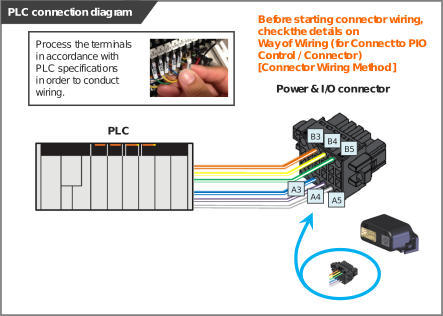
For I/O between the PLC and signals, the signal wiring must be connected to the connector terminal block.
Connect the 1. to 6. wiring to the connector terminal block while referring to the connection diagram.
Connect the 1. to 6. wiring to the connector terminal block while referring to the connection diagram.
- Connect the "B3" connector terminal and the "Backward" ("Forward/Backward" for single solenoid system) output terminal.
- Connect the "B4" connector terminal and the "Forward" output terminal.
(Note) There is no need of connecting "B4" terminal for the single solenoid system. - Connect the "B5" connector terminal and the "Alarm clear" output terminal.
- Connect the "A3" connector terminal and the "Backward complete" input terminal.
- Connect the "A4" connector terminal and the "Forward complete" input terminal.
- Connect the "A5" connector terminal and the "Alarm" input terminal.
◆Double solenoid system
Pin No. | Connector nameplate name | Signal abbreviation | Compatible wire diameter | Function overview |
|---|---|---|---|---|
B3 | Backward | ST0 | KIV0.20mm2 (AWG24) | Backward command |
B4 | Forward | ST1 | Forward command | |
B5 | Alarm clear | RES | Alarm clear | |
A3 | Backward complete | LS0 or PE0 | Backward complete or pressing complete | |
A4 | Forward complete | LS1 or PE1 | Forward complete or pressing complete | |
A5 | Alarm | *ALM | Alarm detection (b-contact) |
◆Single solenoid system
Pin No. | Connector nameplate name | Signal abbreviation | Compatible wire diameter | Function overview | |
|---|---|---|---|---|---|
B3 | Backward | FWBW | KIV0.20mm2 (AWG24) | Forward/Backward Command | |
B4 | Forward*1 | - | - | ||
B5 | Alarm clear | RES | Alarm clear | ||
A3 | Backward complete | LS0 or PE0 | Backward complete or pressing complete | ||
A4 | Forward complete | LS1 or PE1 | Forward complete or pressing complete | ||
A5 | Alarm | *ALM | Alarm detection (b-contact) | ||
*1 It is not to be used in the single solenoid system.
Brake Release Wiring
For the specification with brake, when installing a forcible brake release switch, connect wiring to the "B2" connector terminal.
It is not necessary to layout cables when the ELECYLINDER is not equipped with a brake or when it is not required to have the compulsory brake release.
Power capacity of 24V DC ±10% / 200mA or higher is required.
It is not necessary to layout cables when the ELECYLINDER is not equipped with a brake or when it is not required to have the compulsory brake release.
Power capacity of 24V DC ±10% / 200mA or higher is required.
Pin No. | Connector nameplate name | Signal abbreviation | Compatible wire diameter | Required specifications |
|---|---|---|---|---|
B2 | Brake release | BKRLS | KIV0.20mm2 (AWG24) | 24V DC ±10% / 200mA or more |
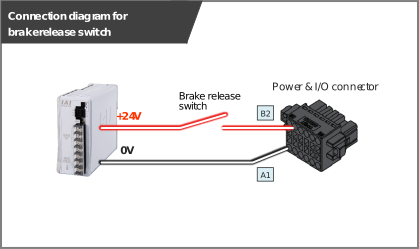
(Note) Brake release is available also from a teaching tool.
Refer to Teaching Tool Connections and Testing Operation for detail.
Refer to Teaching Tool Connections and Testing Operation for detail.