
Operating Conditions (AVD) Setting / Adjustment
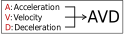
Setting item | Unit | Explanation |
|---|---|---|
A: Acceleration | [%] or [G] | Set the acceleration between 1 and 100%. Touch the Unit Change to switch the units to [G], allowing entries to be made in increments of 0.01G. |
V: Velocity | [%] or [mm/s] | Set the acceleration speed 1 and 100%. Touch the Unit Change to switch the units to [mm/s], allowing entries to be made in increments of 0.01mm/s. |
D: Deceleration | [%] or [G] | Set the deceleration between 1 and 100%. Touch the Unit Change to switch the units to [G], allowing entries to be made in increments of 0.01G. |
Reference
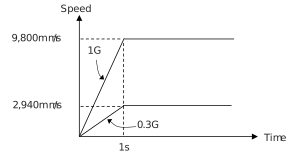
The acceleration/deceleration unit of [G] is described below.
1G = 9,800mm/s2: Acceleration possible up to 9,800mm/s per second.
For 0.3G, the acceleration per second is 9,800mm/s2× 0.3 = 2,940mm/s2.
1G = 9,800mm/s2: Acceleration possible up to 9,800mm/s per second.
For 0.3G, the acceleration per second is 9,800mm/s2× 0.3 = 2,940mm/s2.
The procedure on the following page can be used to configure/adjust the operating conditions (AVD).
Note that the ELECYLINDER has an automatic calculation function for "Maximum velocity and maximum acceleration/deceleration".
Note that the ELECYLINDER has an automatic calculation function for "Maximum velocity and maximum acceleration/deceleration".
Touch the position you want to configure/adjust.
Ten Key window will open.
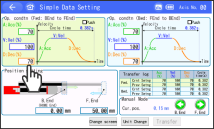
After setting the numerical value, touch the ENT .
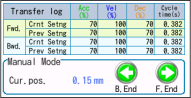
Then touch the Transfer .A value will be written to the controller and the B.End and F.End will turn green.
The "Transfer log" will also be updated.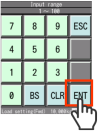
"Crnt Setng" and "Prev Setng" cycle time calculation results are updated.
Press the F.End or B.End to operate. Check the results of the new setting/adjustment.
Caution
- If abnormal noise, vibration or impacts occur when the ELECYLINDER is operated, lower the acceleration and deceleration rates.
Usage without lowering these rates may lead to breakdowns.