
Troubleshooting Diagnosis (for Models with 24V AC Servomotor Equipped)
If a problem occurs, check the following points first in order to ensure quick recovery and prevent recurrence of the problem.
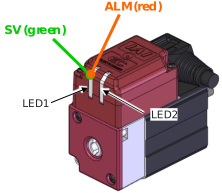
- Check in ELECYLINDER main body of status LED1 (Servo / Alarm)
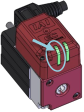
○: Light ON, ×: Light OFF, ★: Blinking
LED1 (Servo / Alarm) | Operation status | *ALM signal (*1) output status | ||
|---|---|---|---|---|
SV (green) | ALM (red) | |||
× | × | Power OFF, Servo OFF | OFF | |
× | ○ | Alarm generated | OFF | |
Stop switch ON (When using teaching pendant) | ON | |||
○ | × | Power ON, Servo ON | ON | |
★ (Green 500ms ⇔ Red 500ms alternate blinking in 1 Hz cycle) | Maintenance warning generated (When the travel count or the travel distance has exceeded the set value, or when overload warning is generated) | ON | ||
○ (both green and red ON) | Initializing when power comes ON | OFF | ||
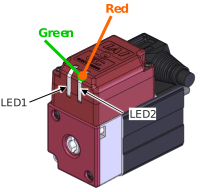
- Check in ELECYLINDER main body of status LED2 (wireless)
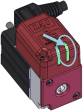
○: Light ON, ×: Light OFF, ★: Blinking
LED2 (Wireless) | Wireless status | |
|---|---|---|
Green | Red | |
× | × | Wireless hardware initializing Wireless not connected (transmitting monitor data) Connecting from wired teaching pendant |
× | ★ (ON 200ms/OFF 200ms alternate blinking) | Wireless hardware error |
★ (ON 150ms/OFF 150ms alternate blinking) | × | Connecting through wireless |
- Check for abnormality in the master device (PLC, etc.)
- Check the voltage of the main power supply (24V DC)
Check for momentary power failure, voltage drop, power failure, etc. - Confirm the generated alarm
Check the alarm information with the teaching tool. - Check the connectors for disconnection or incomplete connection
- Check the cables for connection error, disconnection or snagging
Cut off the main power supply of the equipment (to avoid electric shock) and remove the cables around the measurement point (to avoid conductivity through the surrounding circuit) before checking the conductivity. - Check the I/O signals
Use the master device and ELECYLINDER teaching tool to check for inconsistency or abnormality in the input/output signal status of the two units. - Check the noise elimination measures (grounding, connection of noise suppressor, etc.)
- Check the events leading to the occurrence of the problem, as well as the operating conditions at the time of occurrence
- Analyze the cause
- Countermeasures
Caution
- When troubleshooting, exclude normally functioning parts from the targets to narrow down the causes.
- First, check 1. to 10. so that countermeasures can be taken swiftly
Reference
- For details/countermeasures of an occurred alarm, it is also available to check in the help window in IA-OS or touch panel teaching tool.